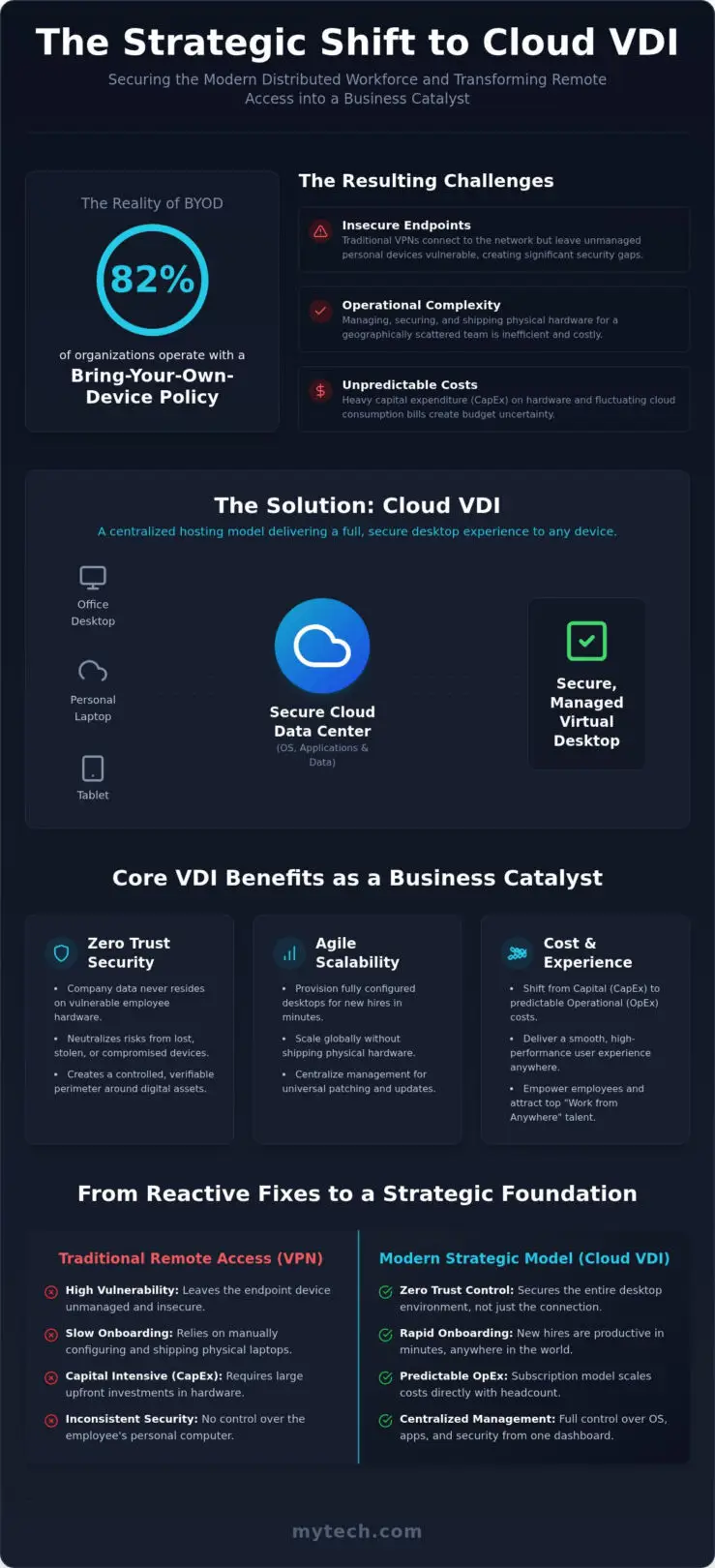
With 82% of organizations now operating with Bring-Your-Own-Device (BYOD) programs, the line between personal convenience and corporate security has never been thinner. You likely recognize the daily tension of supporting a flexible, hybrid workforce while keeping sensitive data off unmanaged home laptops. It’s a complex balancing act to manage physical hardware for a team scattered across different regions, especially when latency issues or unpredictable cloud bills start to impact your bottom line. Finding the right cloud VDI solutions for remote teams shouldn’t feel like a trade-off between ironclad security and a seamless user experience.
We believe that operational tools should be catalysts for success, not sources of stress. You want your employees to feel empowered by their technology, not hindered by it. This guide will show you how to select and implement a cloud VDI solution that secures your workforce without compromising on performance. We’ll walk through the strategic differences between consumption-based and fixed-price models, ensuring you have the clarity needed to make a confident decision. By the end, you’ll see how to transform your remote access from a simple utility into a stable foundation for long-term organizational growth.
Key Takeaways
- Learn why shifting from emergency access to a strategic distributed model makes Cloud VDI the new standard for secure business growth.
- Explore the core security benefits of a Zero Trust framework that keeps your proprietary data centralized and off individual endpoint devices.
- Compare the most effective cloud VDI solutions for remote teams to determine whether consumption-based flexibility or fixed-fee predictability fits your budget.
- Follow a structured framework to audit your application ecosystem and align your infrastructure with the specific needs of your unique user personas.
- Understand how proactive Managed IT support and Microsoft 365 optimization ensure your virtual environment remains a stable catalyst for productivity.
The Evolution of Remote Work: Why Cloud VDI is the New Strategic Standard
Remote work has transitioned from a temporary emergency measure to a permanent strategic pillar for modern organizations. This shift requires a move away from reactive fixes toward a stable, distributed workforce model. Many businesses are discovering that cloud VDI solutions for remote teams provide the necessary framework to maintain security without sacrificing the user experience. By centralizing the compute power in the cloud, you remove the burden of managing individual physical machines and create a more resilient operational foundation.
The economic landscape of IT is also evolving. The traditional model of heavy capital expenditure (CapEx) involved purchasing expensive hardware and hoping it met needs for years to come. Today, the shift toward operational expenditure (OpEx) allows for predictable cloud subscriptions. This transition enables you to scale your costs directly with your headcount. While traditional VPNs served a purpose in the past, they often fail to meet today’s demands. A VPN essentially opens a door into your network, but it doesn’t secure the device on the other side. This creates a significant vulnerability that modern leaders can no longer ignore.
Beyond Remote Access: VDI as a Business Catalyst
Adopting Desktop virtualization is about more than just logging in from home; it’s a catalyst for growth. In competitive talent markets like Denver and Minneapolis, the ability to support a “Work from Anywhere” culture is a major advantage. Virtualized environments significantly accelerate employee onboarding. Instead of waiting for a physical laptop to be configured and shipped, a new hire can be productive in minutes. This approach decouples your business data from vulnerable physical endpoints, ensuring that if a laptop is lost or stolen, your proprietary information remains safely in the cloud.
The Death of the Unmanaged Device
The risks associated with “Bring Your Own Device” (BYOD) policies are high when users access corporate resources directly. Without virtualization, you have little control over the security posture of an employee’s personal computer. Cloud VDI solves this by centralizing control over the entire desktop environment rather than just the connection. You manage the operating system, the applications, and the security protocols from a single dashboard. Cloud VDI is a centralized hosting model that delivers full desktop experiences to any device. This allows your team to use the hardware they prefer while you maintain the professional standards and security your organization requires.
Core Benefits of Cloud VDI: Security, Performance, and Scalability
Implementing a Zero Trust security model starts with the assumption that no device or user is inherently safe. Cloud VDI acts as the ultimate gatekeeper in this architecture. By hosting the entire desktop environment in a secure data center, you ensure that sensitive company information never actually resides on an employee’s physical hardware. This approach effectively neutralizes the risks associated with lost or stolen devices, as the data remains protected behind multi-factor authentication and encrypted streams. When you deploy cloud VDI solutions for remote teams, you’re not just providing access; you’re creating a controlled, verifiable perimeter around your digital assets.
The ability to scale globally is another strategic advantage that traditional infrastructure simply can’t match. If your organization expands its operations into new markets like Dallas or Long Beach, you can provision fully configured desktops for new hires in minutes rather than days. This agility reduces the burden on your internal staff, as they no longer need to manually image, ship, and troubleshoot physical machines across the country. Centralized management allows for universal patching and software updates, ensuring your entire fleet remains compliant and secure with a single action. This streamlined workflow is a key component of robust Business Continuity and Disaster Recovery planning, as localized hardware failures no longer lead to prolonged downtime.
Performance Optimization for Remote Teams
The old myth that virtual desktops are inherently “laggy” has been dismantled by modern protocol optimizations. Technologies like RDP and HDX now intelligently manage bandwidth to provide a crisp, responsive experience that feels local. For engineering or design teams in manufacturing hubs, GPU-enabled VDI instances provide the raw power needed for CAD and 3D modeling without requiring a $5,000 workstation at every home office. Collaboration is also seamless; by following best practices for Microsoft Teams on VDI, organizations can offload multimedia processing to the local client. This prevents the “hairpinning” effect and ensures video calls remain clear and synchronized, regardless of where the user is located.
Risk Management and Compliance
Maintaining compliance with HIPAA, SEC, or specific manufacturing standards becomes significantly easier when all activity is centralized. Cloud VDI provides comprehensive logging and auditing capabilities that are difficult to achieve with a fleet of standalone laptops. You can easily prevent data exfiltration by disabling local drive mapping, print functions, or USB access at the policy level. This ensures a consistent security posture across your entire hybrid team, regardless of the individual’s location or the device they choose to use. Our team can help you navigate these complex configurations through Strategic IT Consulting to ensure your technology supports your long-term health.
Comparing Leading Cloud VDI Solutions: A Strategic Analysis
Selecting the right platform from the available cloud VDI solutions for remote teams requires a deep understanding of your operational goals. It isn’t just about the technology; it’s about how that technology integrates with your existing workflows. Azure Virtual Desktop (AVD) remains the gold standard for organizations heavily invested in the Microsoft ecosystem. It offers deep integration with Windows 11 and provides a flexible, consumption-based pricing model. This allows your costs to scale precisely with your usage, which is ideal for businesses with fluctuating workloads or seasonal staff.
For organizations prioritizing simplicity, Windows 365 provides a different approach. Known as the “Cloud PC,” it offers a fixed, per-user monthly subscription. As of July 1, 2026, pricing for Microsoft 365 E3 has adjusted to $39.00 per user, while E5 is $60.00. This model provides budget predictability that many finance leaders prefer. Outside of the Microsoft-native stack, Amazon WorkSpaces remains a robust alternative for those already operating within the AWS infrastructure. However, it’s important to monitor service changes, such as the retirement of PCoIP-based WorkSpaces Personal starting in late July 2026, to ensure your environment remains supported and secure.
Azure Virtual Desktop vs. Windows 365
The choice between AVD and Windows 365 often comes down to your internal IT capacity. AVD offers maximum flexibility, allowing you to choose specific VM types like the D-series v5 for balanced compute or specialized GPU instances for heavy design work. This flexibility requires more hands-on management and a clear strategy for Microsoft 365 optimization to control costs. Conversely, Windows 365 removes the complexity of infrastructure management, delivering a pre-configured desktop that’s ready for immediate use. Your decision should align with whether you value granular control or operational ease.
Third-Party Overlays: When to Use Citrix or VMware
In some scenarios, a native cloud solution might not meet the needs of a complex, legacy environment. Citrix DaaS and VMware Horizon provide advanced management layers that can span across hybrid-cloud setups. These platforms offer a “single pane of glass” to manage desktops that might reside both on-premises and in the cloud. They also provide superior support for specialized industry hardware and peripherals that native solutions might struggle to recognize. While AVD offers a streamlined, native experience within the Azure ecosystem, Citrix provides a more granular management layer for organizations with complex, multi-cloud requirements. This extra layer can be vital for maintaining a consistent user experience across diverse global locations.
Strategic Selection Framework: Aligning VDI with Business Goals
Choosing between different cloud VDI solutions for remote teams requires a disciplined approach that extends beyond simple technical specifications. You shouldn’t view this as a one-size-fits-all purchase. Instead, it’s a strategic alignment of your technology with your long-term organizational health. A successful implementation begins with a thorough audit of your application ecosystem. You must determine which tools are native SaaS applications and which are legacy, on-premises programs that require high-performance proximity to your data. This clarity prevents the operational friction that occurs when applications aren’t optimized for a virtual environment.
Our framework for selection follows five essential steps to ensure your foundation is secure and scalable:
- Step 1: Audit your application ecosystem. Identify legacy software that requires specific resource allocations.
- Step 2: Define your user personas. Separate task workers who need basic productivity tools from power users who require high-compute resources.
- Step 3: Evaluate network infrastructure. Ensure your team’s bandwidth can support the streaming requirements of a high-definition virtual desktop.
- Step 4: Determine your security baseline. Align your VDI settings with your specific industry compliance requirements, such as HIPAA or SEC standards.
- Step 5: Calculate the Total Cost of Ownership (TCO). Factor in the reduced costs of hardware replacement and the time saved by your internal IT staff.
The User Experience (UX) Litmus Test
Productivity hinges on a seamless user experience. If your team members in San Antonio or Denver encounter high latency, their engagement will drop. We recommend testing your chosen solution from multiple remote locations to ensure the “lag” myth remains a thing of the past. Beyond speed, you must ensure that local peripherals like specialized printers or scanners integrate without complex workarounds. Implementing Single Sign-On (SSO) is also vital. It removes the frustration of multiple logins and encourages employee adoption by making the virtual desktop feel like a natural extension of their physical device.
Budgeting for the Cloud: Avoiding Surprise Invoices
Cloud costs can become unpredictable if they aren’t managed with a proactive mindset. To keep your budget stable, you should implement auto-scaling and “shutdown” policies that turn off virtual machines when they aren’t in use. You can also leverage your existing Microsoft 365 entitlements to reduce licensing overhead. Linking these costs to your broader strategic IT support roadmap ensures that every dollar spent on virtualization contributes to your overall growth. If you’re ready to align your infrastructure with your business objectives, our team provides the Strategic IT Consulting necessary to lead you through this transition with confidence.
Implementation and Managed Support: Ensuring Long-Term VDI Success
The successful deployment of cloud VDI solutions for remote teams marks the beginning of a new operational chapter, not the conclusion of a project. Many organizations fall into the “set it and forget it” trap, assuming that cloud-native environments manage themselves. In reality, virtual desktops require consistent, proactive attention to remain both performant and cost-effective. Without regular performance tuning and resource auditing, user experiences can slowly degrade while unmonitored cloud consumption leads to budget overruns. Moving from a reactive fix-it mindset to a strategic management model ensures that your technology remains a stable catalyst for your organization’s growth.
Proactive monitoring is the difference between a frustrated workforce and a productive one. It involves more than just checking for uptime; it requires deep analysis of application latency, resource utilization, and security logs. By identifying bottlenecks before they impact the end user, you maintain the high-performance standards established during the initial rollout. This ongoing optimization also includes keeping your environment aligned with the latest platform updates, such as the newest versions of Teams optimization for VDI. This level of care transforms your virtual infrastructure into a reliable foundation that empowers your team to work with confidence from any location.
Managed VDI vs. In-House Administration
The burden of providing 24/7 support for a distributed workforce is a significant operational challenge. If an employee in a different time zone encounters a connectivity issue, an in-house IT team may not have the capacity to respond immediately, leading to costly downtime. Managing these complex environments also requires specialized cloud expertise that often comes with high salary overhead and recruitment difficulties. Partnering with a managed provider allows you to access this specialized knowledge as a strategic asset. We focus on continuous cost optimization, ensuring your environment scales down during off-hours so you don’t pay for idle resources. This approach allows your internal leaders to shift their focus away from granular technical frustrations and toward high-level business objectives.
The Mytech Approach: Personalized Local Partnership
We bridge the gap between complex digital landscapes and tangible business value. By combining global cloud power with local managed IT services in Minneapolis, Denver, Dallas, and San Antonio, we provide a level of accountability that anonymous providers can’t match. Our team implements proactive security layering designed to protect your VDI environment from emerging threats before they reach your network perimeter. We view our role as a seasoned guide, helping you navigate the complexities of cloud infrastructure while ensuring your technology roadmap aligns with your long-term health. We’re invested in the success of our partners and believe that the right tools should provide both freedom and security. Schedule a strategic consultation to build your tech roadmap today.
Building a Resilient Foundation for Your Distributed Workforce
Transitioning to a virtualized environment is a strategic investment in your organization’s long-term health and security. By decoupling business data from physical hardware, you create a Zero Trust foundation that empowers your team to work from anywhere without compromising on performance. We have explored how the right selection framework and proactive management transform cloud VDI solutions for remote teams from a simple utility into a powerful catalyst for growth. This journey ensures your technology remains stable, secure, and ready to scale alongside your business objectives.
With 25+ years of experience as a Microsoft Solutions Partner, we understand the complexities of modern digital landscapes. Our local experts in Minnesota, Colorado, Texas, and California are dedicated to providing the personalized support and strategic IT consulting you need to thrive. We’re here to help you navigate these transitions with confidence and clarity. Align your technology with your business goals; contact Mytech Partners for a Cloud Assessment.
Embracing the future of work starts with a secure and reliable foundation. We look forward to helping you build a more flexible and resilient organization.
Frequently Asked Questions
Is cloud VDI better than a VPN for remote work?
Cloud VDI provides superior security compared to a traditional VPN because it prevents data from ever reaching the end-user’s physical device. While a VPN creates a secure tunnel into your network, the data still resides on the remote laptop, which creates a significant risk if the device is lost or compromised. VDI keeps all information within your controlled cloud environment, providing a cleaner Zero Trust architecture that protects your proprietary data.
How much bandwidth does a remote employee need for cloud VDI?
Most remote employees require a stable connection with at least 5 to 10 Mbps of download speed for standard office applications. If your team handles high-definition video or complex design work, we recommend 25 Mbps or higher. It’s important to remember that latency is often more critical than raw bandwidth; a low-latency connection ensures the click-to-screen response feels instantaneous and local for the user.
Can we use our existing laptops with a new cloud VDI solution?
You can absolutely use your existing hardware, including older laptops, tablets, or even thin clients, to access your virtual environment. Since the processing power and memory are hosted in the cloud, the local device acts primarily as a viewing portal. This allows you to extend the lifecycle of your current hardware assets while still providing a high-performance experience to your distributed workforce without requiring a massive hardware refresh.
What is the difference between VDI and Desktop as a Service (DaaS)?
VDI refers to the underlying technology of hosting desktop environments on a central server, while Desktop as a Service (DaaS) is the cloud-based delivery model. When you choose cloud VDI solutions for remote teams, you’re usually adopting a DaaS model where the infrastructure is managed by a provider like Microsoft or Amazon. This shifts the burden of hardware maintenance and infrastructure management away from your internal IT team.
How does cloud VDI help with HIPAA or legal compliance?
Cloud VDI simplifies compliance by ensuring that sensitive information remains within a centralized, encrypted data center rather than on disparate laptops. This architecture supports HIPAA and SEC requirements by providing detailed audit logs and preventing unauthorized data downloads or USB transfers. It creates a verifiable, consistent security posture that is much easier to defend during a regulatory audit because the data never leaves your secure perimeter.
What happens to our cloud VDI if the office internet goes down?
If your physical office loses internet connectivity, your cloud VDI environment remains completely unaffected and accessible from any other location. Remote workers can continue their tasks without interruption, and office-based staff can quickly resume work from home or via a mobile hotspot. This resilience is a key component of a robust Business Continuity and Disaster Recovery strategy, ensuring that a local outage doesn’t result in a total loss of productivity.
Is cloud VDI cost-effective for small businesses with under 50 employees?
Cloud virtualization is highly cost-effective for smaller organizations because it replaces large, upfront server investments with a predictable monthly subscription. Small businesses can access enterprise-grade security and performance without the need for a massive internal IT department. This model allows you to scale your technology costs precisely with your headcount, ensuring you only pay for the resources your team actually uses to stay productive.
How long does it take to migrate a team to Azure Virtual Desktop?
A standard migration to Azure Virtual Desktop typically takes between two to four weeks from the initial planning phase to full deployment. The timeline depends on the complexity of your application ecosystem and the number of distinct user personas we need to configure. Our team focuses on a structured approach to ensure the transition is seamless and doesn’t disrupt your daily operations while we optimize your cloud VDI solutions for remote teams.