By Nina Adams, Consulting Practice Director, Mytech Partners
Inspired by a recent Mytech educational video session featuring Nina Adams and Corey Falls, Senior Business Technology Advisor.
Artificial intelligence can produce an answer that is polished, detailed, confident, and completely wrong.
We recently ran a simple test. We asked an AI tool how many days of the week contain the letter “D.” It confidently answered three. When challenged, it changed the answer to four. Then six. Only after another correction did it finally arrive at seven.
It’s funny when the question is about days of the week. It’s much less funny when an organization is asking AI about a company policy, financial information, sensitive data, or a decision that affects a client.
That doesn’t mean organizations should stop using AI. It means leadership needs to understand what AI is good at, where it can go wrong, and how much confidence to place in the answer.
More importantly, an incorrect AI response isn’t always just an AI problem. What an organization asks, what information AI can access, and how that information is managed can all affect the result.
Key Takeaways
- A confident AI answer is not necessarily an accurate one. Important information still needs human verification.
- How a question is asked can influence the answer. Specific, open-ended prompts can help reduce ambiguity.
- Accurate AI depends on accurate, organized information. Multiple versions and outdated documents can create conflicting answers.
- AI governance and access management matter because AI can work with information users already have permission to access.
- Reliable AI use should become an organizational habit, with appropriate human review, clear policies, training, and reusable practices.
Why Does AI Give Confident Answers That Are Wrong?
Generative AI is designed to produce a useful response. That doesn’t mean every response is factual.
AI works by recognizing patterns and predicting what should come next. That makes it incredibly useful for drafting, summarizing, brainstorming, and working through information. But it can also create a convincing answer when the information isn’t there.
Here’s another example worth sitting with. An AI tool was asked about a supposed 1996 treaty between the United States and the “Republic of San Mongolia.” It provided a detailed explanation of the treaty’s importance and even described how it was supposedly viewed in academic circles.
There was one rather significant problem: the country doesn’t exist.
More detail did not make the answer more accurate. It only made it sound more convincing.
AI models continue to improve, and Corey Falls, Senior Business Technology Advisor at Mytech Partners, has noticed fewer of these failures than he used to see. But improvement doesn’t remove the need for judgment.
“We just need to be comfortable with fact checking and checking multiple sources.”
— Corey Falls, Senior Business Technology Advisor, Mytech Partners
For leadership, that’s an important distinction. AI can dramatically accelerate part of the work without becoming the final authority on the work.
One way we describe AI is as a really helpful intern. Give that intern research to do. Let it produce a first draft or help you think through an issue. But before an important recommendation, policy, contract, or client communication goes out the door, a knowledgeable person still needs to review it.
The level of review should also match the level of risk. Asking AI to brainstorm themes for the company picnic carries very different consequences from asking it to interpret financial, healthcare, legal, or contractual information.
Can Better Prompts Make AI Answers More Reliable?
Yes, but a better prompt doesn’t make verification unnecessary.
Vague questions give AI more gaps to fill. “Summarize the policy” sounds straightforward, but which policy? Which version? What should the summary focus on? Who is it for?
Specificity gives the tool more useful direction:
“Be very specific when we prompt and give it a role, give it context and ask it for format or output.”
— Nina Adams, Consulting Practice Director, Mytech Partners
Instead of asking AI to simply summarize an IT policy, for example, you could identify the relevant policy, explain the audience and ask the tool to identify unclear areas along with producing the summary.
There’s another prompting habit that is easy to miss: don’t lead the witness.
Suppose you’re comparing business performance. There is an important difference between asking:
“Wasn’t Q3 better than last year?”
and asking:
“How did Q3 compare with the previous period?”
The first question already suggests the conclusion you want. The second leaves room for the information to drive the answer.
“I’m constantly reminding myself not to lead the witness.”
— Corey Falls, Senior Business Technology Advisor, Mytech Partners
That may be one of the most human challenges with AI. We often come to a question with an outcome in mind. A tool designed to be helpful can reinforce that conclusion if we aren’t careful about how we frame the request.
Organizations can also encourage uncertainty instead of forcing an answer. We build instructions into our AI usage that allow the model to say when it isn’t certain rather than guess. For important factual work, we may also ask for sources so the information can be checked.
And if the answer matters, don’t automatically trust the first response just because it arrived quickly.
How Does Bad Data Affect AI Results?
There is a familiar saying from the database world: garbage in, garbage out.
AI didn’t retire that rule. If anything, AI makes good information management more important.
We worked with a Copilot agent built for HR onboarding. The agent was asked how much paid time off an employee had after three years.
Sometimes it answered 15 days.
Other times it answered 20.
The team spent time reviewing the instructions and troubleshooting the agent. Eventually, they discovered the problem wasn’t the prompt. Two different versions of the employee handbook were stored in the relevant SharePoint document library.
The correct answer was 20 days, but AI had conflicting source information available to it.
That situation will probably sound familiar to organizations with files named something like:
IT Policy Final
IT Policy Final Version 2
IT Policy 2024 Updated
The files weren’t created because of AI. The information-management problem was already there. AI simply made that problem more consequential.
“I think everybody was secretly hoping that AI was going to kind of clean this up for us, but that’s not how it works.”
— Corey Falls, Senior Business Technology Advisor, Mytech Partners
There’s your junk drawer.
For years, organizations could live with duplicate documents, old versions and unclear ownership because employees often knew which file was “really” the current one. An AI tool doesn’t necessarily have that institutional knowledge.
That’s why AI readiness is connected to basic information-management practices.
Which document is authoritative? Who owns it? What happens to the outdated copy? Are employees working from a clear source of truth? Is old information appropriately archived?
Those aren’t glamorous AI questions. They are, however, some of the questions that determine whether AI can produce useful business results.
The good news is that an organization doesn’t need to clean every digital junk drawer overnight before it can begin exploring AI. Start with the information connected to the use cases that matter most. Establish reliable sources of truth there, then continue improving data hygiene over time.
Why Does AI Governance Matter If We Already Have Permissions?
Because artificial intelligence can make an existing access problem much easier to surface.
In a recent client situation, an employee was able to find sensitive employee information that they should not have been able to see. The SharePoint site owner had intended to share a folder but inadvertently provided access more broadly. The inappropriate access had existed for six months before it was discovered.
The lesson isn’t that AI secretly bypassed security.
As we often explain:
“Copilot will look at those permissions and it will honor the permissions, but if the permissions are incorrect or there’s oversharing, we’re going to give people access into things they shouldn’t have.”
— Nina Adams, Consulting Practice Director, Mytech Partners
That distinction is critical.
If permissions were already too broad, AI can make the consequences more visible because employees have a faster way to find and work with information they technically have access to.
Organizations should therefore treat AI adoption as a reason to revisit ordinary governance practices, especially around sensitive information.
Who has access to the HR site? What about finance? Does a former guest still need access? Are old shared links still active? When was the last access review?
The review cadence should reflect the sensitivity of the information. A broad organizational access review could happen annually, while areas containing more sensitive information may justify more frequent review.
This is also where practices such as sensitivity labels, data loss prevention, application approval, and AI monitoring can fit into a broader information-protection strategy.
But technology controls are only part of the answer.
What Should an AI Acceptable-Use Policy Accomplish?
Employees are going to experiment with AI.
Pretending otherwise doesn’t create governance. It creates a blind spot.
“The organization hasn’t offered up an AI policy or really any direction on how to be using it. And I think that leads them to believe that the employees aren’t using it, but they are.”
— Corey Falls, Senior Business Technology Advisor, Mytech Partners
A useful artificial intelligence acceptable-use policy shouldn’t simply become a page of “no.”
It should help employees understand what information the organization has, which information is sensitive, which AI tools are approved, and what uses cross the line.
We describe this as creating a green lane.
Public-facing information may be appropriate for one type of AI use, while contracts, financial information, client information, personally identifiable information or protected health information require much more care.
Rather than leaving employees to guess, leadership can make the safe path obvious.
That matters when someone is moving quickly. An employee may not intend to put company information at risk. They may simply see a useful AI tool and think it can save them an hour.
Corey’s advice is refreshingly simple:
“We just want people to slow down a little bit and say, ‘Hey, before you upload that document or that information, is it proprietary?”
— Corey Falls, Senior Business Technology Advisor, Mytech Partners
And if an employee doesn’t know, the organization’s policy should make it easy to ask before uploading the information.
One page of practical guidance that employees understand can be far more valuable than silence.
How Can Leadership Make Reliable AI Use an Organizational Habit?
Good AI use shouldn’t depend on having one enthusiastic employee who happens to be fantastic at prompting.
The goal is to turn good individual habits into organizational habits.
Start with human review. Decide where AI can assist independently and where a knowledgeable person needs to approve the final result. The higher the potential consequences, the stronger the review should be.
Then capture what works.
If someone develops an effective prompt for a recurring process, don’t make every employee rediscover it. Turn it into a reusable template. Build a shared prompt library. Give teams a consistent starting point that can be improved as they learn.
“It’s not just an individual here and here and here doing it really well. It’s a whole team doing it in the same way consistently.”
— Nina Adams, Consulting Practice Director, Mytech Partners
Organizations can also track where AI produces unreliable results. If a particular tool or process repeatedly struggles with a certain task, employees shouldn’t have to learn the same lesson individually.
Over time, those experiences can inform training, policies, approved use cases and internal guidance.
The result isn’t perfect AI. That’s not a realistic operating standard.
It’s a more mature way to use AI.
The Bigger AI Question Isn’t “Can We Trust It?”
Asking whether you can trust AI makes the issue sound binary.
A better question is: What would need to be true for us to trust this particular AI-assisted result?
For a low-risk brainstorming exercise, the answer may be very little.
For a client recommendation, financial decision, employee policy or other high-impact use, the answer may include an authoritative source, sound prompt, appropriate permissions, source verification and knowledgeable human review.
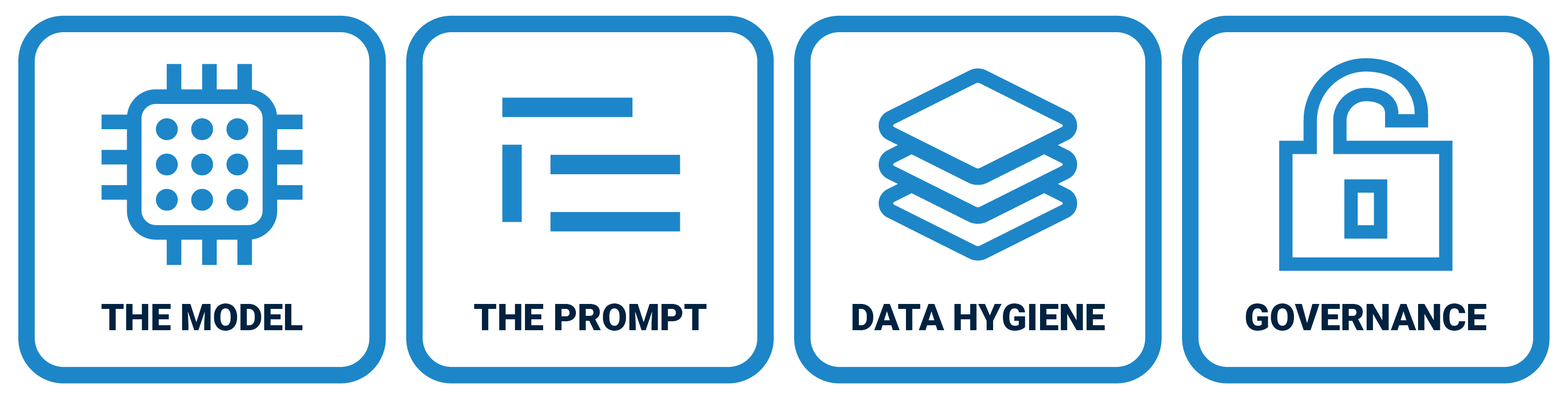
That’s why AI readiness extends well beyond selecting the right technology. Organizations need to consider their data, governance, policies, employee habits, use cases and training together.
The biggest mistake leadership can make is treating AI reliability as only a software problem. It is also an information-management and governance problem.
You don’t need everything perfected before you start. But you do need to know where you are.
Mytech’s AI readiness work helps organizations evaluate their current approach to AI, including governance, data hygiene, policies, training and use cases, then identify practical priorities for moving forward.
Whether your organization is crawling, walking or already running with AI, the goal is the same: make progress without leaving good judgment behind.
Ready to understand where your organization stands? Request a Mytech AI Readiness Assessment and get a clear, scored path toward responsible AI adoption.
Frequently Asked Questions
What is an AI hallucination?
An AI hallucination is commonly used to describe a situation where an AI tool produces information that appears credible but is incorrect or unsupported. For business users, the practical takeaway is to verify important factual claims rather than relying on confidence or detail as evidence of accuracy.
Why does AI give incorrect information?
Incorrect AI output can have several causes, including the model itself, the way the user prompts it, the quality of the information available to the AI, and the organization’s data governance and access controls.
How can businesses make AI answers more reliable?
Businesses can improve reliability by giving AI specific context and instructions, asking open-ended rather than leading questions, grounding work in reliable source information, verifying important factual claims, and keeping appropriate human review in the process.
Can poor data quality affect AI?
Yes. If AI has access to conflicting or outdated information, it can produce conflicting results. The employee-handbook example above demonstrates this directly: an agent produced different answers because two handbook versions existed in the relevant document library.
Does Microsoft Copilot ignore existing permissions?
No. Copilot honors existing permissions. The risk arises when those permissions are already incorrect or broader than intended. Organizations should therefore review access and oversharing as part of AI readiness.
Does my organization need an AI acceptable-use policy?
An acceptable-use policy can give employees clear guidance about approved AI tools, appropriate use cases and what types of company information require greater protection, rather than relying only on restrictions.
Do humans still need to review AI-generated work?
For consequential work, yes. Treat AI like a helpful intern and match the amount of human scrutiny to the risk of the task. Higher-impact uses should receive more review than low-risk brainstorming or planning.