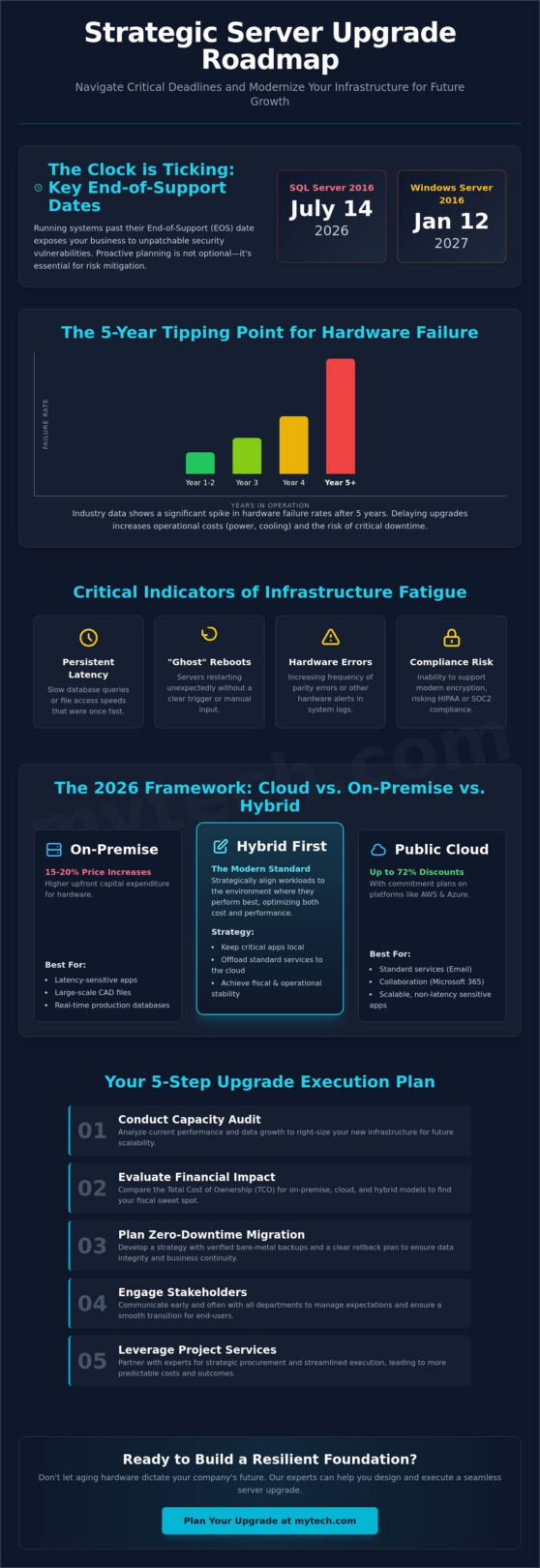
What if the hardware you’re working so hard to maintain is actually the biggest risk to your company’s growth? With Windows Server 2016 reaching its end of extended support on January 12, 2027, and SQL Server 2016 support ending July 14, 2026, the window for reactive fixes is closing fast. We know that effective business server upgrade planning feels daunting, especially when you’re balancing 15% to 20% hardware price increases against the need for better performance. It’s natural to worry about data loss during migration or the shifting costs of new subscription models like those recently introduced by VMware.
We’re here to help you move past that uncertainty. This article provides a strategic roadmap to master server lifecycle management, ensuring your transition is both secure and seamless. You’ll learn how to navigate the complexities of Cloud versus on-premise costs while building a scalable environment that supports your business for the next three to five years. We’ll walk through a step-by-step planning guide designed to deliver a zero-downtime migration and a more resilient technical foundation.
Key Takeaways
- Identify the critical five-year tipping point where hardware failure rates spike to transform your server lifecycle from a reactive struggle into a proactive growth strategy.
- Evaluate the financial impact of public cloud versus on-premise hardware to determine if a “Hybrid First” approach provides the best stability for your organization.
- Master business server upgrade planning by conducting a comprehensive capacity audit to right-size your infrastructure for future scalability.
- Secure your data with a zero-downtime migration strategy that emphasizes verified bare-metal backups and early stakeholder communication.
- Learn how leveraging Project Services and strategic procurement can streamline your upgrade process and offer more predictable costs than managing the transition internally.
Recognizing the Signs: When to Begin Your Business Server Upgrade Planning
Proactive business server upgrade planning isn’t just about replacing old boxes; it’s a fundamental risk-mitigation strategy for 2026. As hardware ages, the cost of maintaining stability often exceeds the cost of modernizing. We view infrastructure as the foundation of your success, and a cracked foundation eventually affects every part of the organization. Understanding What is a Server? in the context of modern business helps stakeholders realize these machines are the heartbeat of operational continuity. When they fail, productivity stops.
Industry data consistently points to the “Rule of 5.” After five years of continuous operation, hardware failure rates increase significantly. While some believe “sweating assets” saves money, the reality is often the opposite. Older servers consume more power and generate more heat, leading to higher utility bills and increased strain on cooling systems. These hidden costs erode your budget while increasing the likelihood of an emergency outage. Effective business server upgrade planning accounts for these performance dips before they become financial drains.
Upgrades generally fall into two categories: hardware-driven and software-driven. Hardware upgrades happen when your current capacity can’t keep up with your data growth or AI workload demands. Software-driven upgrades are dictated by vendor timelines. For instance, Windows Server 2016 reaches its end of extended support on January 12, 2027. Waiting until the final month to plan is a recipe for operational stress and security gaps. We help you balance these timelines so your hardware and software stay in sync.
Critical Indicators of Infrastructure Fatigue
Your hardware often signals its decline before a total crash occurs. Watch for persistent latency in database queries or file access speeds that used to be instantaneous. You might notice “ghost” reboots where a server restarts without a clear trigger, or hardware parity errors in system logs. These aren’t just minor annoyances; they’re warnings. Additionally, if your current hardware can’t support modern encryption, you risk falling out of compliance with HIPAA or SOC2 standards.
Software Lifecycle and End-of-Support (EOS) Risks
Running an operating system past its extended support date leaves your business exposed to unpatchable vulnerabilities. Hackers actively target these legacy systems because they know no more security fixes are coming. This risk extends to outdated firmware, which can create backdoors even if your software is current. We recommend aligning your upgrade schedule with strategic IT support to map out all software dependencies. This ensures that when you upgrade your environment, your critical business applications remain compatible and secure.
The 2026 Framework: Cloud, On-Premise, or Hybrid Infrastructure?
Choosing between cloud and on-premise infrastructure is no longer a binary decision; it’s a strategic alignment of specific workloads to the environments where they perform best. Modern business server upgrade planning requires a nuanced evaluation of the Total Cost of Ownership (TCO). While on-premise hardware vendors like Dell and Lenovo saw price increases of 15% to 20% in early 2026, major cloud providers like Azure and AWS offer commitment discounts of up to 72%. We help you weigh these capital expenditures against monthly recurring fees to find the balance that secures your long-term fiscal health.
For many mid-market organizations in Denver and Minneapolis, a “Hybrid First” mentality has become the standard. This approach keeps latency-sensitive applications, such as large-scale CAD files or real-time production databases, on local hardware while offloading standard services to the cloud. As you Plan Your Windows Server Upgrade Path, consider that the ideal destination for a specific application might not be where it currently resides. We often find that Microsoft 365 optimization significantly reduces the local server burden by moving email and collaborative file storage into a managed, secure ecosystem.
If you’re unsure which workloads belong in the cloud, our Strategic IT Consulting team can help you map out a migration strategy that prioritizes both performance and cost-efficiency.
Public Cloud Migration (Azure/AWS)
The public cloud is the optimal choice for organizations with remote workforces or variable workloads that require rapid scaling. By shifting to an OpEx model, you replace the heavy upfront costs of physical hardware with a predictable monthly subscription. This flexibility is vital for web applications that experience seasonal spikes in traffic. Cloud Repatriation refers to the strategic move of bringing specific workloads back from the public cloud to on-premise environments to better manage long-term costs or meet strict data sovereignty requirements.
Modern On-Premise & Hyperconverged Infrastructure (HCI)
Manufacturing and healthcare firms in Texas frequently prefer local control due to strict regulatory requirements and the need for zero-latency compute power on the factory floor. Hyperconverged Infrastructure (HCI) allows these organizations to consolidate their data center by combining compute, storage, and networking into a single, software-defined system. This reduces the physical footprint and power consumption of the server room significantly. Integrating these systems with professional IT services and support ensures that your on-site maintenance remains proactive rather than reactive.
Conducting a Comprehensive Performance and Capacity Audit
A successful business server upgrade planning phase begins with a meticulous inventory of every virtual machine and physical asset in your stack. We’ve seen many organizations fall into the trap of simply duplicating their existing hardware specifications. This approach ignores how much technology has advanced and how your business needs have shifted. Instead, we advocate for the “Right-Sizing” principle. This ensures you invest in capacity that matches your current and future workloads without overspending on idle resources. Conducting a performance audit is a critical step for a successful upgrade that helps you identify bottlenecks before they impact your migration.
In 2026, server specifications have evolved rapidly. NVMe storage is no longer a luxury; it’s a baseline requirement for high-speed data access. Similarly, DDR5 memory offers significant bandwidth improvements over previous generations. However, market conditions require careful budgeting. Server DRAM prices spiked by 60% to 70% in early 2026 compared to the previous quarter. This makes accurate capacity planning more vital than ever to avoid unnecessary costs. Additionally, the rising demand for AI-driven workloads means your CPU requirements must account for higher thread counts and specialized instruction sets to handle data-heavy tasks efficiently.
Workload Analysis and Resource Bottlenecks
We use advanced monitoring tools to identify your peak IOPS and RAM utilization over a 30-day period. This data reveals where your current system struggles and where you have excess capacity. Mapping application dependencies is equally important. It prevents “orphaned” services that lose connectivity during the move. We also assess your network backbone. With the IEEE 802.3dj standard for 800G Ethernet expected in late 2026, your server uplinks should at least be ready for 10GbE or 25GbE to avoid becoming a data bottleneck.
Security and Compliance Readiness
Modern server environments require more than just raw power; they require hardware-level security. Verifying TPM 2.0 requirements is essential for secure boot environments and modern encryption. As part of your hardware refresh, we recommend planning for immutable backups. These provide a “locked” copy of your data that ransomware cannot alter. For businesses in Long Beach and San Antonio, local compliance considerations often dictate how and where this data is stored. Proactive business server upgrade planning ensures your new infrastructure meets these legal and security standards from day one.
How to Execute a Seamless Server Upgrade: A Step-by-Step Guide
Execution is where meticulous business server upgrade planning meets operational reality. We approach this phase with a focus on stability, ensuring that your transition doesn’t disrupt the momentum of your organization. A successful upgrade isn’t just about the technical cutover; it’s about clear communication and disciplined risk management. By following a structured roadmap, we move your data with confidence and precision.
The process begins by establishing a firm maintenance window. We communicate this timeline to all stakeholders early, explaining exactly which services will be affected and for how long. Once the window is set, the most critical step is performing a full “bare metal” backup. We don’t just create the backup; we verify the restoration process to ensure the data is viable before we touch the live environment. For maximum security, we follow the 3-2-1 backup rule: maintain three copies of your data on two different media types, with at least one copy stored offsite.
Next, we choose the most efficient migration path. This might involve a Physical-to-Virtual (P2V) move, a Virtual-to-Virtual (V2V) transfer between hosts, or a Clean Install for a fresh start on new hardware. We always execute a pilot phase first, migrating non-critical workloads to test the environment’s stability. Only after the pilot succeeds do we proceed to the final cutover and post-migration validation testing to ensure every application performs as expected.
If you want to ensure your next infrastructure project is handled with precision, our team provides the expert strategic IT support needed for a successful transition.
The Pre-Migration Checklist
A smooth move depends on the details. We document all static IP addresses and DNS records to prevent connectivity issues after the switch. We also verify that all third-party software licenses are compatible with the target operating system. This is especially vital in 2026, as many vendors, including VMware, have shifted exclusively to subscription-based models that may require core-based licensing adjustments during your upgrade.
Risk Mitigation and Rollback Planning
We define a clear “Point of No Return” in the upgrade timeline, which is the specific moment when a rollback is no longer feasible without significant downtime. To mitigate this risk, we often maintain a parallel environment, allowing for an instant failback if the new system encounters unexpected errors. Finally, we prioritize staff training. We ensure your team understands any new interface changes or access protocols so they can return to work without frustration the moment the upgrade is complete.
Why Partnering with an MSP Simplifies Infrastructure Upgrades
Attempting a “DIY” approach to server migration often leads to hidden costs and extended downtime. When internal teams try to manage complex business server upgrade planning alongside their daily tickets, critical details can slip through the cracks. We offer a Fixed-Fee Project model that removes this operational stress. This structure provides a predictable budget and a clear timeline, ensuring your upgrade finishes on schedule without surprise expenses. By treating the upgrade as a strategic pivot rather than just a hardware swap, we help you build a more resilient organization.
One of the most immediate benefits of partnering with us is our procurement leverage. As we noted previously, hardware and DRAM prices have seen significant increases in early 2026. We use our established vendor channels to secure better pricing and availability than most businesses can find on their own. Beyond the hardware itself, our physical presence in Minneapolis, Denver, and Dallas is a vital asset. Having local experts on-site during a physical cutover provides the peace of mind that any hardware issues will be resolved instantly. This local support is a cornerstone of our managed IT support and services.
From Project Implementation to Proactive Management
We don’t just walk away once the new server is racked and stacked. Mytech transitions every successful upgrade into a cycle of 24/7 proactive monitoring. Your dedicated vCIO (Virtual Chief Information Officer) works with you to align this new infrastructure with your three-year business goals. We’ve spent years refining this process across the healthcare, legal, and manufacturing sectors. This experience allows us to anticipate the specific regulatory and performance requirements of your industry, ensuring your tools act as catalysts for success.
Ensuring Long-Term Business Continuity
A server upgrade is the perfect time to strengthen your Disaster Recovery (DR) plan. We integrate your new hardware into a robust recovery framework that protects against data loss and hardware failure. Our team also manages ongoing firmware and patch updates to prevent “version drift,” which can lead to security vulnerabilities over time. By maintaining this disciplined approach, we ensure your foundation remains secure and stable long after the initial migration. If you’re ready to modernize your environment with a partner invested in your long-term health, Schedule a Strategic Technology Assessment with Mytech Partners today.
Securing Your Operational Foundation for 2026 and Beyond
Transitioning your infrastructure is a significant milestone that defines your operational agility for years to come. By moving beyond reactive maintenance and embracing a hybrid strategy, you ensure your business remains secure against the looming end-of-support dates for legacy systems. This proactive approach to business server upgrade planning transforms a technical necessity into a competitive advantage, providing the stability required for long-term growth.
Navigating these complexities doesn’t have to be a solo journey. With over 20 years of server migration experience and local engineering teams in six major US metros, we provide the steady hand your organization needs. Our certified Microsoft and cloud infrastructure experts focus on delivering a stable, secure foundation so you can lead your team with confidence. We’ve refined our process to eliminate the stress of migration, allowing your tools to serve as catalysts for success rather than sources of concern.
Plan your next move with a Mytech Strategic Technology Assessment. Let’s work together to build a roadmap that supports your vision with reliability and professional excellence. Your future success starts with a secure today.
Frequently Asked Questions
How long does a typical business server upgrade take?
A typical upgrade project spans four to eight weeks from the initial audit to the final cutover. While the actual migration of data and services usually occurs over a single weekend, the preceding weeks are vital for procurement and environment staging. This timeline ensures we have sufficient time for rigorous testing before touching your live production data.
Should I choose an in-place upgrade or a clean installation?
We almost always recommend a clean installation over an in-place upgrade for your server operating system. While in-place upgrades might seem faster, they often carry over legacy configuration errors and registry bloat that can cause instability later. A clean install allows us to build a lean, optimized environment that fully supports modern security protocols and performance standards.
What is the average lifespan of a server in 2026?
The average reliable lifespan for server hardware in 2026 remains approximately five years. While physical components might last longer, the “Rule of 5” highlights that failure rates and maintenance costs typically spike after the sixty month mark. Strategic business server upgrade planning focuses on this window to replace hardware before it becomes a liability to your operational continuity.
Can I upgrade my server hardware without replacing the entire unit?
You can certainly upgrade individual components like RAM or storage drives to extend a server’s life for a year or two. However, upgrading the CPU or motherboard often requires replacing the entire chassis to ensure compatibility with modern standards like DDR5 memory. If your core processing power is the bottleneck, a full hardware refresh is usually the more cost-effective long-term investment.
How much downtime should my business expect during a server migration?
Most organizations experience near-zero downtime during the staging phase of a migration. We perform the heavy lifting of data transfer in the background while your team continues to work. The final cutover typically requires a scheduled window of two to four hours, often during off-peak times, to repoint services and verify that all applications are communicating correctly.
Is it cheaper to move my server to the cloud or stay on-premise?
The cost-effectiveness of cloud versus on-premise depends entirely on your specific workload and long-term financial goals. Cloud services offer a predictable OpEx model with commitment discounts of up to 72% for long-term use. On-premise hardware requires a larger upfront CapEx but can be more economical for high-performance, latency-sensitive applications that don’t require rapid scalability.
What happens to my old server hardware after an upgrade?
We prioritize security and environmental responsibility when retiring your legacy hardware. This process includes certified data destruction to ensure no proprietary information remains on the drives. Once the data is wiped, the hardware is typically sent to a specialized recycling partner who disposes of the electronic components in compliance with local environmental regulations.
Do I need to upgrade my network switches when I upgrade my server?
You should evaluate your network switches as part of your business server upgrade planning to avoid creating a data bottleneck. If your new server supports 10GbE or 25GbE uplinks but your switches are limited to 1GbE, you won’t see the full performance benefits of your investment. Upgrading your backbone ensures that your network speed matches the high-speed throughput of modern NVMe-based servers.