Multi-factor authentication is one of the most powerful tools in your cybersecurity arsenal, so making sure it works properly is essential. If you use Microsoft’s MFA tool (Microsoft Authenticator), you may be affected by a change Microsoft is making to the way you authenticate.
Microsoft recently announced that, starting on May 8th, it will be moving all users of Microsoft Authenticator push notifications to a different method of authentication: number matching. This is another type of MFA that increases login security by requiring the user to enter a one-time two digit code, and removes ambiguity compared to the push notification method.
Keep reading to get some context for this change, and learn how the new system works.
Why are they changing it again?
MFA is an incredibly effective safeguard, but it’s not flawless. You may recognize the concept of “MFA Fatigue”: many users will click “approve” by habit any time an MFA notification pops up. Usually this request is legitimate…but how could you tell just by looking at the request? Some attackers take advantage of that ambiguity, trying to sneak a malicious login attempt through and hoping the user clicks “approve” anyway out of habit or mixup.
Number matching protects against this, by requiring the user to input a one-time code for each separate authentication request. Because a different code is generated for each authentication instance, simply logging in with a stolen password and hoping to get approved is no longer a viable attack method. This is why the Cybersecurity & Infrastructure Security Agency (CISA) recommends number matching as a more secure alternative to traditional push notification MFA.
Number matching isn’t airtight – attackers can still try to phish a user by tricking them into inputting the impostor’s code – but it makes the attack much trickier to pull off.
What’s changing for me?
Beginning on May 8th, the Microsoft Authenticator app will start sending Number Matching requests to users who previously used “deny or approve” -based push notifications. This change is not expected to affect users who authenticate through a texted code, or users who type a code (“token”) from their Authenticator app into their device; the change is only supposed to affect users who are literally prompted to click a button labeled “approve.”
“Push notification” users will have previously seen versions of the screens below:
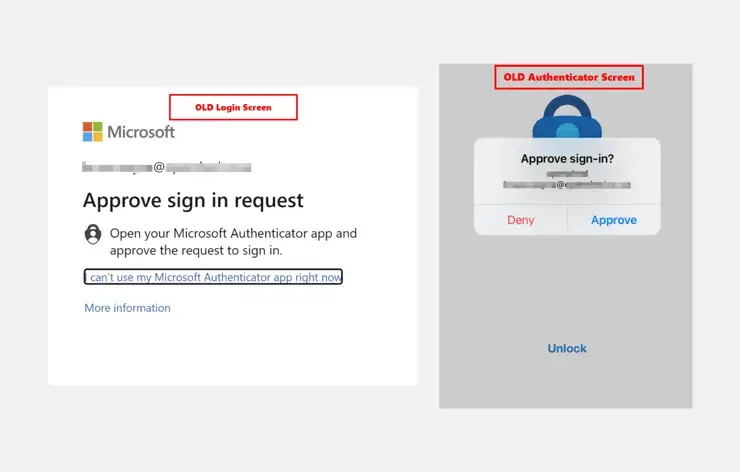
“Push notification” users will now see these new screens instead:

Users attempting to access a mobile Microsoft app must take an extra step (because you’re using the same screen for both the login attempt and the authentication). When the authentication request appears, you’ll need to click “I can’t see the number” to temporarily minimize the window. Find and memorize the number: the authentication window will return after a few seconds, and you can input the number as normal to finish authenticating.
Mobile users will see a version of the screen below:

What if I have problems?
Microsoft has been refining this process in advance of its May 8th “deadline,” and most of the hiccups have been resolved already. However, every technology change carries the risk of disruption. Mytech has been testing these functions for the past few months and we are ready to help our clients with any login or access-related issues they may have.
If your team uses traditional “accept” authentication, you should notify your team so it does not surprise anyone. If you are a Mytech client and have any issues with this authentication process change, please let us know right away.
FAQ
What is number matching in MFA?
Number matching is a multi-factor authentication method that requires users to enter a one-time number shown on their login screen before approving access. This adds a verification step that helps confirm the login request is legitimate and intended by the user.
Why is MFA number matching more secure than simple approval notifications?
Traditional approval notifications can be accepted accidentally or out of habit. Number matching requires users to actively verify a unique code, making it significantly harder for attackers to gain access through repeated authentication requests.
Does this change affect every MFA user?
No. According to the article, the change primarily affects users who previously authenticated by tapping an “Approve” button on a push notification. Users who receive text codes or manually enter authentication codes are generally not affected.
What is MFA fatigue?
MFA fatigue is a tactic where attackers repeatedly send authentication requests hoping a user will approve one by mistake. Number matching helps reduce this risk by requiring a unique code for every login attempt.
How does number matching work on mobile devices?
When signing in from certain mobile applications, users may need to temporarily minimize the authentication prompt, note the displayed number, and then return to enter the code before approving the request.
Should businesses prepare employees for this MFA change?
Yes. Organizations should notify users about the updated authentication experience before rollout. Clear communication helps reduce confusion, support requests, and login delays when employees encounter the new verification process.