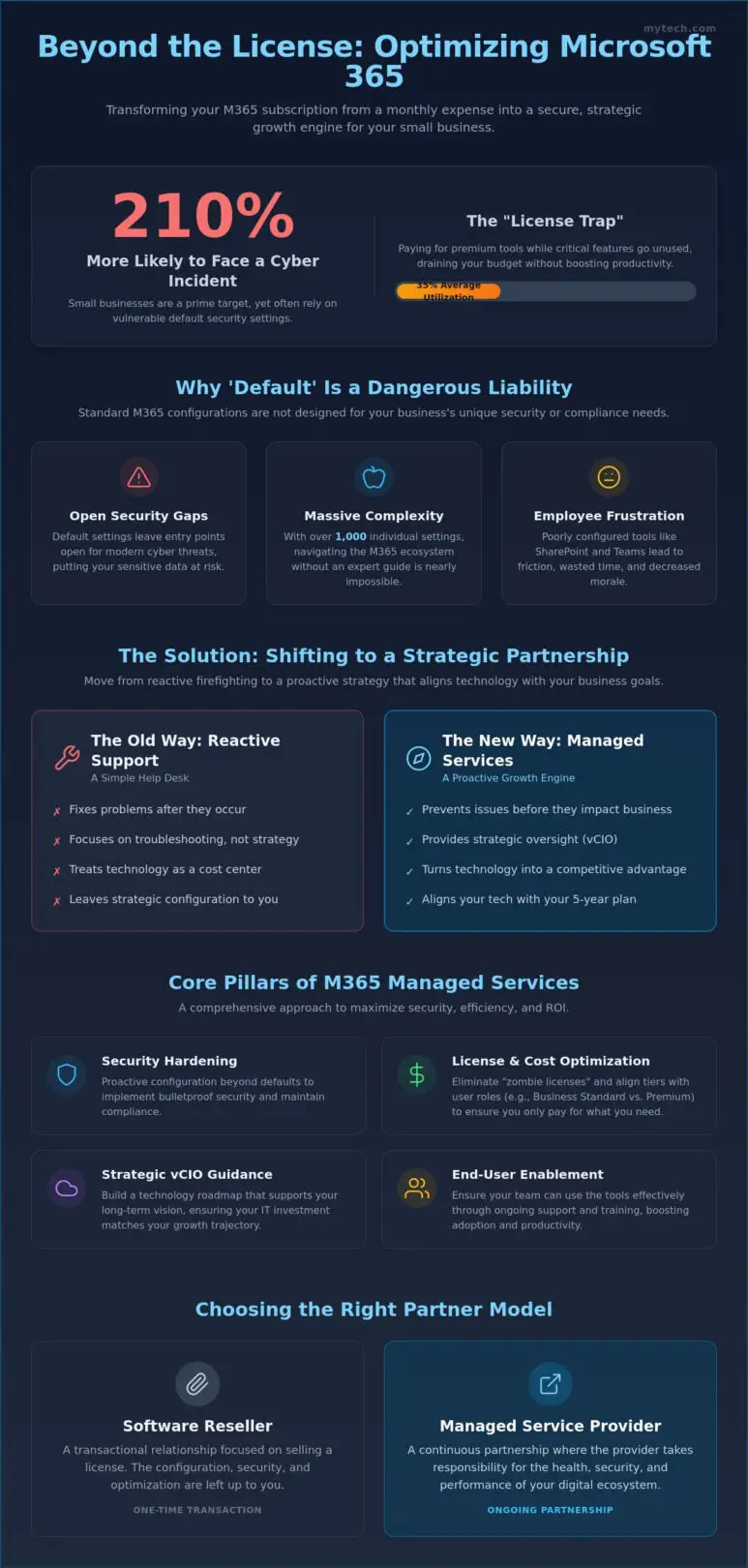
Small businesses are 210% more likely to experience a cyber incident than larger corporations, yet many still rely on default security settings that leave their data vulnerable. You’ve likely felt the frustration of paying for premium licenses while your team struggles with complex tools like SharePoint or ignores the features meant to drive productivity. It’s common to feel that your technology is a mounting monthly expense rather than a catalyst for your success.
We understand that you want more than just a help desk; you need a stable foundation that provides freedom and confidence. This guide will show you how to leverage microsoft 365 managed services for small business to transform your digital environment into a secure, strategic growth engine. We’ll outline how to achieve predictable IT costs, implement bulletproof compliance, and create a technology roadmap that aligns with your long-term vision. By the end of this article, you’ll see exactly how to move from reactive troubleshooting to proactive optimization for 2026 and beyond.
Key Takeaways
- Stop viewing your subscription as a static bill and learn to identify underutilized features that drain your operational budget.
- Understand how microsoft 365 managed services for small business provide the proactive security hardening and strategic oversight needed to turn technical tools into growth catalysts.
- Protect your organization by moving beyond dangerous “default” security settings that leave entry points open for modern cyber threats.
- Discover a five-step framework for auditing your digital environment and aligning license tiers with actual user roles to maximize your ROI.
- Learn why a local partner offers the accountability and strategic guidance necessary to navigate complex digital landscapes with confidence.
Beyond the License: Why Small Businesses Need Managed Microsoft 365
Purchasing a subscription is often mistaken for a complete solution. Many leaders fall into the “License Trap,” believing that a monthly per-user fee automatically translates to productivity. In reality, simply owning the software doesn’t mean your team is utilizing it effectively or securely. Utilizing microsoft 365 managed services for small business ensures that your subscription is more than just a line item; it becomes a strategic asset that drives your organization forward. Without intentional oversight, these tools often become underutilized assets that drain your budget without delivering the promised efficiency.
Common pitfalls for SMBs include redundant software costs, such as paying for external file-sharing services when OneDrive is already included in your plan. This lack of coordination often leads to shadow IT, where employees use unapproved apps to bypass complex or poorly configured internal systems. Professional Managed services bridge this gap by aligning your technical tools with your specific business objectives. This shift moves your organization away from reactive troubleshooting and toward strategic IT support that anticipates your needs before they become obstacles.
The Hidden Complexity of the M365 Ecosystem
The Microsoft 365 environment contains over 1,000 individual settings that govern how data flows through your company. Standard “out-of-the-box” configurations are designed for the masses, not for the unique compliance or operational needs of a growing firm. When these settings are ignored, it creates friction. Employees spend hours fighting with SharePoint permissions or struggling to collaborate on Teams. This frustration eventually erodes morale and can even impact employee retention, as talented staff prefer working with streamlined, modern tools rather than fighting outdated setups.
Strategic Alignment vs. Simple Tech Support
Effective microsoft 365 managed services for small business go beyond a help desk that fixes broken passwords. It’s about building a technology roadmap that supports your five-year plan. At Mytech, we act as a seasoned guide for business owners in Denver and Minneapolis, ensuring your technology investment matches your growth trajectory. This is where the role of a vCIO (Virtual Chief Information Officer) becomes essential. Instead of just maintaining the status quo, a vCIO focuses on Microsoft 365 optimization, identifying exactly which license tiers and security protocols will protect your bottom line while empowering your workforce to do their best work.
What are Microsoft 365 Managed Services?
At its core, microsoft 365 managed services for small business represents a comprehensive partnership that provides proactive maintenance, security hardening, and strategic oversight for your digital environment. This model moves beyond the simple acquisition of software to focus on how those tools actually perform within your unique workflow. Managed Microsoft 365 is a service that ensures software uptime, data security, and user proficiency through continuous technical and strategic optimization.
There is a fundamental difference between a basic software reseller and a dedicated managed service provider (MSP). A reseller typically focuses on the transaction, providing you with a license key and leaving the configuration to your internal team. An MSP stays by your side as a seasoned guide, taking responsibility for the health of your ecosystem. By prioritizing core components like licensing management, security hardening, and end-user support, an MSP transforms a standard subscription into a robust growth engine for your organization.
Proactive Licensing and Cost Management
Managing costs effectively requires more than just paying a monthly bill. It involves a disciplined audit of user accounts to eliminate “zombie” licenses, which are paid seats assigned to former employees or unused functions. A strategic partner helps you Determine If Managed IT Services Are Right For Your Business by aligning your spending with actual needs. For example, we evaluate whether your staff requires Microsoft 365 Business Standard at $14 per user or the advanced security features of Business Premium at $22 per user. Streamlining this process through a trusted managed service provider near you ensures that you only pay for the value you receive.
Continuous Monitoring and Help Desk Support
Reliability comes from 24/7 monitoring of network health and application availability. When your team encounters a hurdle with Outlook or a complex SharePoint sync, a responsive help desk is available to alleviate operational stress. This support doesn’t just fix problems; it ensures seamless integration between your Microsoft 365 environment and other business-critical cloud services. This proactive approach maintains a stable foundation, allowing your employees to focus on their primary objectives rather than technical glitches. If you’re ready to move toward a more stable environment, exploring Microsoft 365 optimization can help you identify the best path forward for your team’s productivity.
Securing Your SMB: Why ‘Default’ Settings are a Liability
A dangerous misconception persists among leadership teams: the idea that being a “small” company provides a natural shield against cybercrime. Hackers rarely target businesses by name. Instead, they deploy automated bots to scan the digital landscape for known vulnerabilities. In fact, small businesses are 210% more likely to experience cyber incidents than their larger counterparts. If your environment relies on standard configurations, you’ve essentially left your digital front door unlocked.
Microsoft 365 defaults are designed for maximum compatibility, not maximum security. This “it just works” approach prioritizes ease of use over protection. Utilizing microsoft 365 managed services for small business allows you to implement a layered security model. This strategy ensures that even if one defense is breached, multiple other barriers remain in place to protect your sensitive data. We help you move beyond the shared responsibility model, where Microsoft secures the infrastructure while you take full control of the security within your specific cloud environment.
Advanced Identity and Access Management
Basic Multi-Factor Authentication (MFA) is no longer the finish line. Modern security requires Conditional Access and Zero Trust protocols. These systems evaluate the context of every login attempt, such as the user’s location and device health, before granting access. This level of scrutiny is vital for protecting remote workforces in San Antonio and Dallas from sophisticated phishing and credential theft. We also manage the entire employee lifecycle, ensuring that access to SharePoint and Teams is granted precisely during onboarding and revoked immediately upon offboarding to prevent residual security gaps.
Compliance and Data Governance
Protecting sensitive client information requires more than just a password. We configure Data Loss Prevention (DLP) to monitor and block the unauthorized sharing of Social Security numbers, credit card data, or health records. This is essential for meeting industry-specific standards like HIPAA, SOC 2, or NIST. For organizations in Texas, leveraging cybersecurity services in San Antonio ensures your business meets local compliance expectations while signaling to your partners that you are a disciplined and reliable organization. This proactive stance turns compliance from a burden into a competitive advantage.
5 Steps to Optimize Your Microsoft 365 ROI
Achieving a genuine return on investment requires a disciplined approach that moves beyond the initial software purchase. Many organizations view their subscription as a static utility; however, microsoft 365 managed services for small business turn this utility into a high-performance engine. We follow a structured five-step framework to ensure your technology spend aligns with your operational goals.
- Step 1: Conduct a comprehensive environment audit. We identify security gaps, redundant applications, and unused features to establish a clean baseline for your digital ecosystem.
- Step 2: Align license tiers with specific user roles. Not every employee needs the advanced features of Business Premium. We help you mix and match tiers to ensure you only pay for the capabilities your team actually uses.
- Step 3: Implement automated workflows. By utilizing Power Automate, we can eliminate repetitive manual tasks, such as data entry or approval routing, saving your staff hours of administrative labor.
- Step 4: Train employees on collaboration tools. We reduce friction by teaching your team how to leverage Teams and OneDrive effectively, ensuring they know where to store data and how to communicate securely.
- Step 5: Leverage AI and Copilot features. We guide you through the integration of AI-powered tools to accelerate creative and analytical tasks, positioning your business at the forefront of modern productivity.
Maximizing Productivity with Teams and SharePoint
Breaking down data silos is essential for a fluid work environment. We help you move from traditional, clunky file servers to a structured SharePoint environment that allows for real-time collaboration. SharePoint serves as a strategic document management platform that improves it services and support efficiency by centralizing access and version control. When Teams is used as a unified communication hub rather than just a video calling tool, your employees gain the freedom to work from anywhere with total confidence in their tools.
The 2026 AI Frontier: Copilot for Small Business
Microsoft 365 Copilot, currently priced at $21 per user monthly as a standalone add-on, acts as a catalyst for growth. It can draft complex reports, summarize lengthy meeting transcripts, and analyze data trends in seconds. However, clean data governance is a non-negotiable prerequisite for success. Without proper permissions and data hygiene, AI tools can inadvertently expose sensitive information to the wrong internal users. We focus on preparing your data for AI, ensuring your team can use these powerful assistants securely and effectively. If you’re ready to see how these tools can transform your workflow, contact us to discuss our Microsoft 365 Optimization services today.
Choosing a Managed Partner for Your M365 Journey
Selecting the right partner to oversee your digital environment is one of the most consequential decisions a business leader will make. It’s not merely about outsourcing technical tasks; it’s about choosing a seasoned guide who understands that technology exists to serve your primary business objectives. When you evaluate microsoft 365 managed services for small business, look for a firm that prioritizes strategic alignment over simple ticket resolution. A partner with a local presence in Minneapolis, Denver, or San Antonio provides a level of accountability and personalized care that a global call center simply cannot replicate.
The Mytech Difference is rooted in our commitment to building a stable foundation that grants you the freedom to focus on high-level growth. We don’t just maintain your systems; we optimize them to ensure they act as catalysts for success. By establishing a secure and predictable digital landscape, we alleviate the operational stress that often keeps stakeholders up at night. This allows you to lead with forward-thinking optimism, knowing your tools are managed by a disciplined and experienced team.
Questions to Ask a Potential M365 Managed Service Provider
Before signing a contract, you must ensure your provider’s philosophy matches your needs. Ask how they handle security configuration compared to simple license reselling. A true partner will explain their process for hardening your environment against modern threats rather than just handing over a license key. Inquire about their approach to strategic technology roadmapping. You need to know if they have a vCIO process to help you plan for the next three to five years. Finally, ask how they support industry-specific compliance requirements to ensure your data governance remains bulletproof as regulations evolve.
The Mytech Partnership: Your Seasoned Guide
Since 2000, Mytech has been dedicated to the long-term health of our partners’ organizations. Our local offices in Texas, Colorado, and Minnesota allow us to provide proactive, hands-on care that feels like a shared journey rather than a distant transaction. We believe that your operational tools should be assets, not liabilities. Our team is invested in your success, providing the disciplined oversight necessary to navigate complex digital landscapes with confidence. If you’re ready to transform your technology from a monthly expense into a growth engine, Schedule a Microsoft 365 Optimization Assessment with Mytech Partners today. We’ll help you identify the specific gaps in your current setup and create a roadmap for a more secure, efficient future.
Secure Your Growth with Strategic Optimization
Your Microsoft 365 environment should be a catalyst for success, not a source of operational stress. By moving beyond default settings and aligning your licensing with actual user needs, you transform a standard subscription into a powerful growth engine. We’ve explored how proactive oversight and a structured technology roadmap provide the stable foundation your leadership team needs to lead with confidence. A secure digital landscape is the prerequisite for modern business agility and resilience.
At Mytech, we bring over 25 years of experience as a seasoned guide in the digital landscape. Our specialized Microsoft 365 Optimization team focuses on turning complex tools into streamlined assets. With local offices providing support in Minneapolis, Denver, and San Antonio, we’re genuinely invested in the long-term health of your organization. Utilizing microsoft 365 managed services for small business ensures your data remains secure while your team remains productive and engaged.
Empower your team with a secure, optimized Microsoft 365 environment; Connect with Mytech today.
The journey toward digital maturity is a shared one. We’re ready to help you navigate the complexities of 2026 and beyond with clarity and purpose.
Frequently Asked Questions
Is Microsoft 365 managed services worth the cost for a small business?
Yes, investing in managed services is worth the cost because it eliminates licensing waste and prevents expensive downtime. Since small businesses are 210% more likely to face cyber incidents than large firms, the protection provided far outweighs the monthly fee. We help you shift from viewing IT as a burden to seeing it as a strategic growth engine that supports your long term success.
What is the difference between Microsoft 365 support and managed services?
Basic support is reactive, focusing on fixing technical issues after they occur. In contrast, microsoft 365 managed services for small business provide proactive oversight, security hardening, and strategic consulting. This partnership ensures your environment is optimized for productivity rather than just being maintained in a cycle of troubleshooting and repair.
Can an MSP help me choose the right Microsoft 365 Business plan?
An MSP helps you navigate the complexity of Business Basic, Standard, and Premium tiers by auditing your actual user requirements. We identify which employees need advanced security features and which can operate on entry level plans. This alignment ensures you don’t overpay for unused licenses or features your team does not utilize in their daily workflows.
How do managed services improve Microsoft 365 security?
Managed services improve security by moving beyond default settings to implement a layered defense model. We configure advanced identity protections like Conditional Access and Zero Trust protocols that verify every login attempt. This disciplined approach secures your remote workforce and protects sensitive data from automated bot attacks and sophisticated phishing attempts.
Do I still need local IT support if I use Microsoft 365 in the cloud?
You still benefit from local IT support because your cloud applications rely on physical hardware and local networks to function. Having a partner in Minneapolis, Denver, or San Antonio provides a level of accountability that global call centers cannot match. We manage the integration between your local devices and your cloud environment to ensure seamless, reliable operations.
What happens to my data if I switch to a managed service provider?
Your data remains securely within your Microsoft tenant during the transition to a managed service provider. Switching simply transfers the administrative oversight and optimization responsibilities to our team of specialists. We conduct a thorough audit of your current setup during the transition to ensure your information is protected and organized according to industry best practices.
Can managed services help with Microsoft 365 compliance for healthcare or legal firms?
Managed services are essential for healthcare and legal firms that must meet strict HIPAA, SOC 2, or NIST standards. We configure Data Loss Prevention and encryption settings to ensure sensitive client information is never shared inappropriately. This strategic oversight helps you maintain compliance while providing the freedom to focus on your primary professional objectives.
How does Mytech Partners handle Microsoft 365 migrations for small businesses?
Mytech Partners handles migrations using a disciplined, phased approach that prioritizes data integrity and minimal downtime. We begin with a comprehensive audit of your existing infrastructure to identify potential hurdles before moving any data. Our seasoned guides lead your team through the transition, ensuring that every user is proficient and secure in their new digital environment.