A newly-discovered malicious exploit for Microsoft Office files has made headlines over the weekend: the “Follina” MSDT attack uses programs like Microsoft Word to execute malicious code when a prepared file is accessed, allowing an attacker significant access to a device, where they can then deploy further exploits and do even greater damage.
As of yet, there is no patch available that completely eliminates the vulnerability, so currently the best defense is user awareness. This exploit requires user input, which can take the form of opening, downloading, or accessing a malicious Microsoft Office file sent by an attacker. Even a single click of an infected file can be enough to execute the malicious code.
What you should do:
The bad news: this exploit requires user input. The good news: this exploit requires user input! If your team members have experience detecting a phishing attempt, they are well-positioned to stop this attack in its tracks. Please notify your team of this vulnerability for Office files, and remind them that they should never click, open, download, or even preview an email attachment that they were not expecting to receive.

That special mention of “previewing” is critical for this exploit. Unlike other vulnerabilities, it doesn’t require approval from the “enable macros” or “enable editing” popups. Simply clicking the attachment, which opens it in an Outlook or Explorer preview window, is enough to execute the malicious code (see example below).
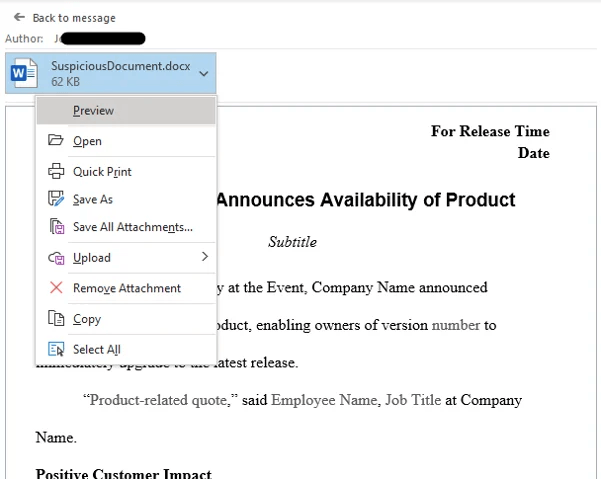
Encourage your team to suppress their curiosity and avoid clicking any unexpected files…not only until this vulnerability is patched, but also as a general rule!
What Mytech is doing:
As soon as the patch is available from Microsoft and confirmed safe to deploy without disruption, Mytech will roll it out to our clients. In the meantime we have implemented several mitigations for our fully managed clients, like deploying email defense to intercept malicious attachments, and turning off certain permissions to limit the damage they can cause. We also employ numerous backend tools to monitor for exploits just like this one, and will be watching diligently for any indicators of compromise (IOCs).
There is no “complete” workaround for this exploit, though, so until the patch is deployed the best way you can protect yourself is by putting your team on guard for phishing attempts. Follow our Security Alerts page for future updates, and read our blog post “Catching a Phish” for some simple tricks you can share with your staff to keep them aware and secure.
FAQ
What is the Follina vulnerability?
The Follina vulnerability is a security flaw that allows a specially crafted Office file to execute malicious code on a device. An attacker can use the vulnerability to gain access to the system and potentially deploy additional malicious activity.
Can previewing an attachment trigger the attack?
Yes. Unlike many traditional Office-based attacks, the article explains that simply previewing or opening a malicious attachment may be enough to execute the exploit. Users do not necessarily need to enable macros or approve editing prompts.
How are attackers using the Follina exploit?
Attackers typically distribute malicious Office files through phishing emails. When a user interacts with the file, the exploit can execute code that provides the attacker with access to the device.
What is the best protection against Follina?
User awareness is one of the strongest defenses. Employees should avoid opening, downloading, previewing, or interacting with attachments they were not expecting and should report suspicious messages to their IT team.
Are security tools alone enough to stop this attack?
No. While layered security controls can significantly reduce risk, the article notes that there is no complete workaround. User vigilance and phishing awareness remain critical components of protection.
What should organizations tell employees about this threat?
Organizations should remind employees to treat unexpected attachments with caution and avoid interacting with files from unfamiliar or unexpected sources. Consistent phishing awareness training helps reduce risk from attacks like Follina.