A business laptop refresh is not a capital expense; it is a strategic productivity insurance policy for your organization. You likely recognize the frustration of employees tethered to sluggish, five-year-old machines that struggle with modern workloads. Creating a proactive business laptop refresh strategy allows you to transition from a cycle of constant hardware troubleshooting to a state of operational confidence. We believe that technology should serve as a catalyst for success rather than a source of help desk friction. By aligning your hardware choices with current standards like Wi-Fi 7 and Neural Processing Units, you provide your team with the freedom to perform their best work.
In this article, you’ll learn how to master the hardware lifecycle with a framework designed for selecting, securing, and deploying business laptops that drive measurable results. We’ll preview the essential specs for 2026, including the shift toward 32GB of DDR5 RAM and the critical role of TPM 2.0 in hardware-based security. By the end, you’ll have a clear roadmap to stabilize your IT budget and empower your hybrid workforce with tools that are as forward-thinking as your business goals.
Key Takeaways
- Identify the hidden “Performance Tax” and learn why a proactive three-year cycle is essential for maintaining organizational momentum in 2026.
- Discover why the Neural Processing Unit (NPU) and 32GB of RAM are now the foundational requirements for modern, AI-enhanced multitasking.
- Strengthen your defense-in-depth by building a business laptop refresh strategy that leverages hardware-level security features like Microsoft Pluton and self-healing BIOS.
- Streamline complex deployments for hybrid teams using a “Swap and Return” model that ensures remote employees remain productive during transitions.
- Explore how strategic IT consulting and vCIO guidance align your hardware investments with your broader three-year business objectives.
The Strategic Lifecycle: Why a 3-Year Refresh Cycle Dominates in 2026
A hardware refresh cycle is a proactive, scheduled replacement of aging assets before they become liabilities. It moves your organization away from the chaotic ‘Run-to-Fail’ model, where devices only get replaced after they stop working entirely. Instead, a phased replacement model ensures your team always has access to reliable tools. This approach is the cornerstone of a modern business laptop refresh strategy. By treating hardware as a rolling asset rather than a one-time purchase, you create a predictable environment for both your budget and your employees. Proactivity pays dividends.
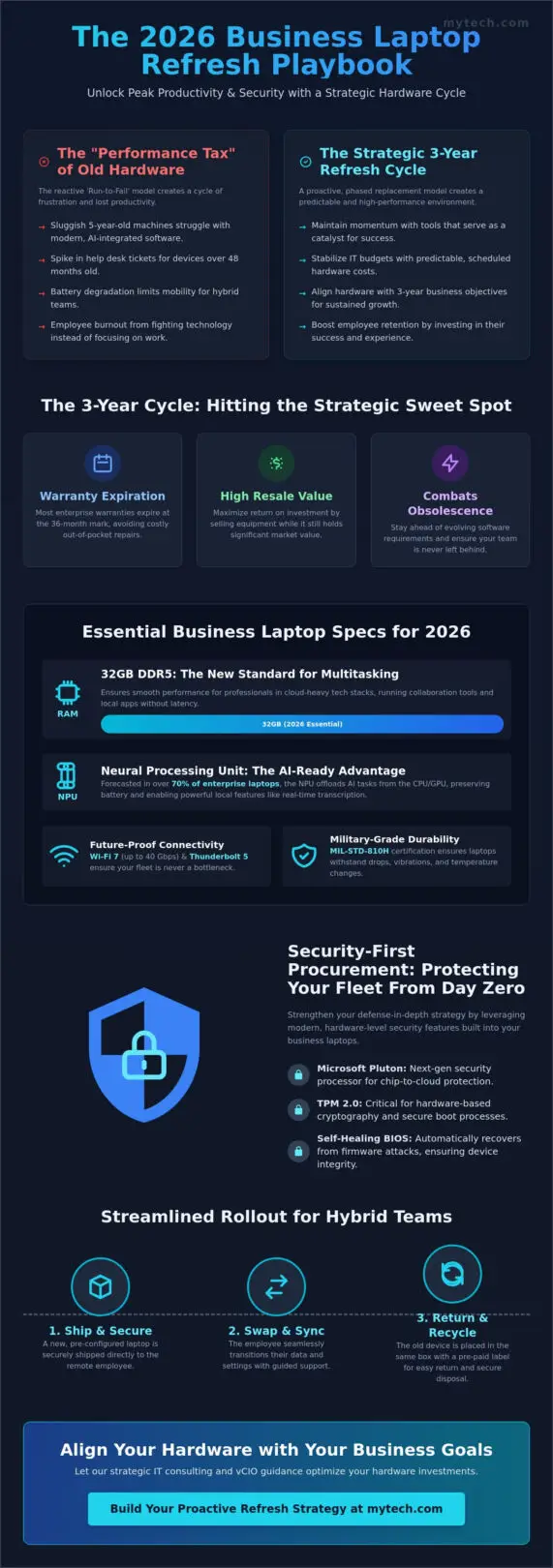
Slow tools kill momentum. In 2026, we see a growing ‘Performance Tax’ on firms using legacy hardware. Outdated processors struggle with AI-integrated software, leading to micro-delays that aggregate into hours of lost billable time every month. A three-year refresh cycle hits the sweet spot for several reasons. First, most enterprise warranties expire at the 36-month mark. Second, the resale value of the equipment remains high enough to offset new procurement costs. Finally, this cycle combats the effects of planned obsolescence, ensuring your team isn’t left behind as software requirements evolve.
Calculating the Real Cost of Hardware Obsolescence
The true cost of a laptop goes far beyond the sticker price. Help desk tickets for devices older than 48 months tend to spike, creating a burden on IT resources that often exceeds the cost of a new machine. Battery degradation also plays a critical role; as cells lose capacity, your hybrid workforce loses the mobility they need to stay productive in various environments. In the context of modern managed services, Total Cost of Ownership is the comprehensive sum of the initial purchase price combined with the long-term expenses of maintenance, security vulnerabilities, and productivity drain over the device’s lifespan.
Employee Retention and the ‘Modern Tools’ Factor
Providing high-quality hardware signals a genuine investment in your staff’s success. When high-growth firms force employees to use sluggish equipment, it often leads to unnecessary burnout and frustration. Reliable tools allow your team to focus on their objectives rather than fighting their technology. We view modern laptops as a fundamental component of a strategic IT support plan that prioritizes the user experience. This alignment ensures that your business laptop refresh strategy supports your broader organizational goals while keeping your best talent engaged and equipped.
How to Choose a Laptop for Business Use in 2026: Technical Requirements
Selecting the right hardware for your business laptop refresh strategy in 2026 requires looking beyond traditional clock speeds. We’ve entered an era where the architecture of the machine matters as much as its raw power. While 16GB of memory was sufficient in years past, 32GB of DDR5 RAM has emerged as the essential standard for professionals multitasking within cloud-heavy tech stacks. This ensures that your team can run resource-intensive collaboration tools alongside local applications without a hint of latency. Reliability starts with sufficient headroom.
Connectivity should never be a bottleneck for your Denver or Minneapolis offices. Future-proof your fleet by prioritizing Thunderbolt 5 and Wi-Fi 7. With Wi-Fi 7 offering speeds up to 40 Gbps and ultra-low latency, your team stays connected even in dense wireless environments. For traveling executives, build quality is paramount. We recommend hardware with MIL-STD-810H certification. This military-grade standard ensures that laptops can withstand the vibrations, drops, and temperature fluctuations common in a high-mobility lifestyle. If you’re looking to refine your procurement process, our strategic IT consulting team can help you identify the specific models that offer the best longevity for your budget.
The Rise of the AI-Ready Workstation
Neural Processing Units (NPUs) are the most critical addition to the 2026 spec sheet. These dedicated chips are forecasted to appear in over 70% of enterprise laptops this year. By offloading AI tasks from the CPU and GPU, NPUs significantly preserve battery life while enabling powerful local features. Your team can utilize real-time transcription and enhanced, AI-driven cybersecurity defenses without draining their charge. When choosing hardware, we suggest ultra-portables for mobile sales teams and robust mobile workstations for your engineering or creative staff to ensure the tool matches the task.
Display and Ergonomics for the Hybrid Era
The physical design of a laptop directly impacts daily productivity. A 16:10 aspect ratio provides more vertical screen real estate, which is superior for document-heavy legal and financial workflows. Because hybrid work relies on clear communication, high-quality webcams and AI-powered noise-canceling microphones are now non-negotiable for Microsoft 365 optimization. Integrating these hardware choices with it support and managed services ensures that your docking stations and peripherals remain compatible across your entire organization, creating a seamless experience whether an employee is at home or in the office.
Security-First Procurement: Protecting Your Fleet from Day Zero
A common question we hear from stakeholders is why an organization should invest in business-grade laptops when consumer models at retail outlets are significantly cheaper. The answer lies in the foundation of your security posture. Consumer devices often lack the silicon-level protections required to defend against sophisticated 2026 threats. A strategic business laptop refresh strategy prioritizes security-first procurement to ensure every device enters your ecosystem with a hardened shell. We believe that protecting your data starts long before the first login.
Business-grade hardware includes essential features like TPM 2.0 for secure key storage and the Microsoft Pluton security processor, which provides integrated chip-to-cloud protection. We also prioritize devices with self-healing BIOS capabilities. If a firmware attack occurs, the system automatically detects the corruption and reverts to a known safe state without manual intervention. These features are not just optional extras; they’re the bedrock of a stable and secure environment. By selecting hardware designed for the enterprise, you eliminate common vulnerabilities that attackers frequently exploit in cheaper, consumer-grade alternatives.
In a zero-trust architecture, identity is the new perimeter. Biometric authentication via Windows Hello ensures that only authorized users gain access while removing the vulnerabilities of traditional passwords. Additionally, modern hardware facilitates faster remote wipe and recovery procedures. If a device is lost or compromised, your IT team can execute a secure erase command that renders data unrecoverable in minutes. This provides a level of freedom and confidence that allows your mobile workforce to operate without the constant fear of a data breach.
Supply Chain Security and Trusted Vendors
Mid-sized businesses often face significant risks from ‘gray market’ hardware procurement, where devices might have compromised firmware integrity or lack official support. We prioritize vetted manufacturers and transparent supply chains to mitigate these risks effectively. This disciplined approach to hardware selection is a vital component of our cybersecurity services in San Antonio and Dallas, where we help partners build resilience from the ground up. Knowing your hardware comes from a trusted source is the first step in a reliable defense strategy.
Automated Provisioning with Windows Autopilot
Your choice of hardware also dictates the speed and efficiency of your deployment. Using Windows Autopilot, we enable zero-touch provisioning that ships pre-configured devices directly to your employees’ homes or satellite offices. This removes the logistical burden from your internal IT team and eliminates the need for manual imaging in a central lab. Modern provisioning through Autopilot reduces deployment downtime by up to 80%, allowing your team to stay focused on high-value objectives from day one. This streamlined process ensures that new tools are catalysts for success rather than sources of operational stress.
Planning the Rollout: Logistics for Hybrid Teams in Major Hubs
Executing a seamless transition is where a business laptop refresh strategy proves its value. We move beyond simply buying boxes and focus on the complex logistics of getting those tools into the hands of your team without disrupting their workflow. The process begins with meticulous staging. This includes imaging the devices with your corporate profile, applying asset tags for tracking, and pre-installing essential software. By handling these steps before the laptops leave the lab, we ensure that the first time an employee opens their new machine, it’s ready for immediate use. Proactivity in the staging phase eliminates the ‘first-day friction’ that often plagues hardware rollouts.
For hybrid teams in hubs like Denver or Long Beach, we implement a ‘Swap and Return’ model. We ship the new, pre-configured device directly to the employee’s location. Once they confirm the new machine is operational, they use the same packaging to return their old asset to us. To minimize downtime, we leverage cloud-based profiles through OneDrive and SharePoint. This allows files to sync automatically, removing the need for the manual data migrations that used to take hours. A clear communication plan is essential here. We provide employees with a detailed timeline and simple setup instructions, which alleviates the operational stress of the transition. This structured approach ensures your team feels supported throughout the journey.
Managing Local Deployment and E-Waste
Businesses in Minneapolis and San Antonio face specific challenges regarding the secure disposal of old hardware. We prioritize certified data destruction for all decommissioned drives to prevent sensitive information from ever leaving your control. Our partner facilities provide documented proof of recycling, ensuring your organization meets environmental and compliance standards. A managed it services minneapolis partner handles the heavy lifting of these logistics, from initial staging to final disposal. This comprehensive approach allows your leadership to focus on growth while we manage the physical lifecycle of your assets.
Post-Deployment Support and Validation
The work doesn’t end when the laptop is delivered. We establish a ‘hyper-care’ period immediately following a rollout to provide rapid assistance for any user questions. During this time, we validate that all security protocols and Microsoft 365 applications are functioning as intended. We also conduct a post-refresh audit to update your centralized asset management database. This ensures your records are accurate for future planning and compliance needs. If you’re ready to streamline your next hardware rollout, contact our team today for strategic IT consulting tailored to your organization’s specific needs.
Beyond the Box: How a Managed Service Provider Optimizes Your Strategy
A successful business laptop refresh strategy is not a one-time procurement event; it is a continuous lifecycle managed with precision. We believe that hardware should never be a source of operational stress. Instead, it should provide a stable foundation for your organization’s growth. Our vCIOs (virtual Chief Information Officers) play a critical role in this process by aligning your hardware roadmap with your specific three-year business goals. This strategic oversight ensures that every laptop you deploy is a purposeful investment in your team’s future productivity and security.
Standardization is another pillar of a mature hardware strategy. When you maintain a standardized fleet, you significantly reduce help desk complexity. Your IT team no longer needs to manage a fragmented landscape of different drivers, docking stations, and spare parts. This consistency streamlines troubleshooting and ensures a uniform experience for every employee. By leveraging our deep vendor relationships and procurement margins, we help you access enterprise-grade equipment while lowering your total hardware spend. This approach transforms hardware from a series of disjointed purchases into a core component of your long-term it services and support.
Predictable IT Budgeting with Managed Services
Many organizations struggle with the financial ‘shock’ of bulk hardware refreshes or the chaos of emergency spending when legacy devices fail. We help you transition to a predictable model that treats hardware as a manageable operational expense. By forecasting your spend 12 to 24 months in advance, we allow your leadership to plan with confidence. A phased implementation model replaces a small percentage of your fleet every quarter, which stabilizes your IT budget and ensures your team always has access to modern, high-performance tools without a massive upfront capital hit.
Your Strategic Partner in Growth
Choosing a partnership approach over a simple transactional purchase changes how you view technology. We encourage our partners to look at their hardware fleet as a catalyst for success rather than a cost center. When your employees are equipped with reliable, AI-ready workstations, they have the freedom to focus on high-value objectives. We are genuinely invested in the long-term health of your organization and possess the experience to guide you through the complexities of the digital landscape. If you are ready to move toward a more stable and secure foundation, Schedule a Technology Roadmap Session with Mytech today.
Secure Your Organization’s Future Performance
A well-executed business laptop refresh strategy is the difference between an organization that merely survives technical shifts and one that thrives because of them. We’ve explored how a proactive three-year cycle preserves both capital and productivity while ensuring your team has the AI-ready tools they need to succeed. By prioritizing security at the hardware level and automating your rollout logistics, you eliminate the operational stress that often accompanies growth.
With over 20 years of experience in strategic IT consulting, Mytech Partners provides the seasoned guidance needed to lead you through these complex digital landscapes. Our dedicated vCIOs work directly with your leadership to align hardware investments with your long-term organizational health. Whether you operate in Minneapolis, Denver, San Antonio, or Dallas, our local expertise ensures your foundation remains stable and secure. Your operational tools should be catalysts for success, not obstacles to manage. Ready to build a technology roadmap that actually works? Connect with Mytech Partners today.
The journey toward a more efficient, secure, and predictable IT environment starts with a single strategic step. We’re here to help you take it with confidence.
Frequently Asked Questions
What is the ideal laptop refresh cycle for a small business in 2026?
A three-year cycle is the ideal standard for small businesses in 2026. This timeframe aligns with most manufacturer warranties and ensures your team doesn’t fall behind the rapid advancements in AI-integrated hardware. Refreshing at this interval also maximizes the resale value of your fleet, which helps offset the costs of new procurement. It prevents the performance tax that inevitably accumulates as devices age and software demands increase.
Should I lease or buy my business laptops?
Leasing often proves superior for organizations that prioritize predictable monthly expenses and want to stay current with the latest technology. It allows you to treat hardware as an operational expense rather than a large capital outlay. Buying may be preferable if your organization plans to keep devices for longer than four years, though this often increases long-term maintenance costs and security risks as hardware components reach the end of their reliable life.
How do I ensure data is securely wiped from old laptops?
You should utilize professional software-based wiping tools that meet NIST 800-88 standards or opt for physical drive shredding. Simply deleting files or formatting a drive isn’t enough to prevent sophisticated data recovery. We recommend obtaining a certificate of destruction for every decommissioned asset to maintain compliance and protect your organization’s sensitive information. This ensures that no residual data remains before the hardware is recycled or resold by a trusted partner.
What are the minimum specs for a business laptop in 2026?
Minimum specifications for a business laptop in 2026 include 32GB of DDR5 RAM and a dedicated Neural Processing Unit (NPU) for AI tasks. You should also look for Wi-Fi 7 and Thunderbolt 5 connectivity to ensure your fleet remains compatible with modern office peripherals. These specs provide the necessary headroom for multitasking within resource-intensive cloud environments. Prioritizing these components ensures your hardware remains relevant throughout its entire three-year lifecycle.
Does a laptop refresh strategy really improve employee productivity?
Yes, a proactive business laptop refresh strategy significantly improves employee productivity by reducing hardware-related downtime and frustration. Faster processors and modern SSDs allow staff to complete tasks without waiting on their tools. Additionally, fewer help desk tickets mean your team stays focused on their primary objectives rather than troubleshooting aging equipment. Reliability creates a stable foundation that allows employees to work with greater confidence and speed.
How can a Managed Service Provider help with hardware procurement?
A Managed Service Provider helps by managing the entire lifecycle, from strategic IT consulting to final disposal. We leverage our vendor relationships to secure better pricing and handle the complex logistics of imaging and deployment. This partnership ensures your hardware choices align with your broader organizational goals while removing the administrative burden from your internal staff. We act as a seasoned guide to help you navigate the complexities of digital procurement.
What is the difference between consumer and business-grade laptops?
Business-grade laptops offer superior build quality, hardened security features like Microsoft Pluton, and longer support lifecycles compared to consumer models. Manufacturers design these machines for 40-plus hours of weekly use, while consumer models often prioritize aesthetic appeal over durability. Business hardware also includes professional versions of operating systems that are essential for centralized management, security compliance, and seamless integration with your existing organizational network.
How do I handle laptop refreshes for a fully remote workforce?
Handling refreshes for remote teams requires a “Swap and Return” model supported by zero-touch provisioning like Windows Autopilot. We ship pre-configured devices directly to the employee’s home, where they can log in and begin working immediately. This approach ensures your business laptop refresh strategy remains effective regardless of where your team is located. It maintains high security and productivity standards while providing a seamless experience for your distributed workforce.