



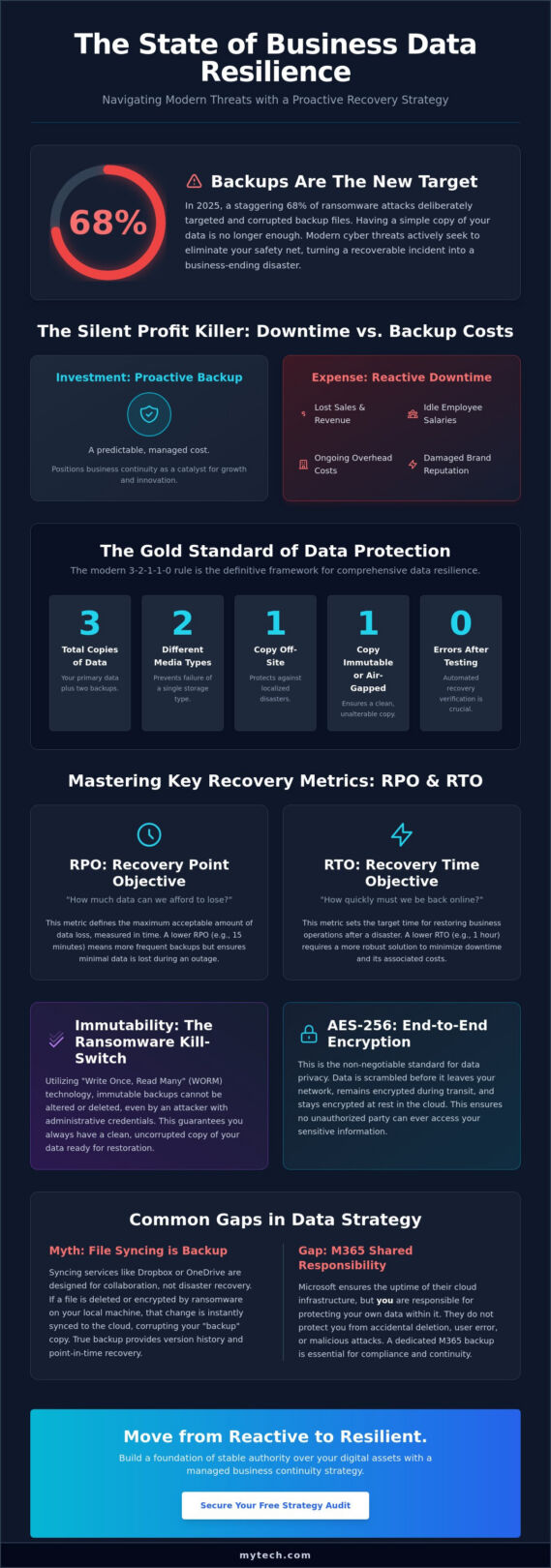
In 2025, 68% of ransomware attacks specifically targeted the very backups meant to protect the organization. You likely already understand that cloud backup solutions for business are a baseline requirement for survival. However, many leaders feel the weight of uncertainty, wondering if their data is truly recoverable or if hidden egress fees and slow restoration times will stall their growth during a crisis. It’s time to move from a reactive posture to a foundation of calm, stable authority over your digital assets.
We’re here to help you bridge the gap between simple storage and a comprehensive recovery strategy. You’ll learn how to implement the new 3-2-1-1 rule, ensure compliance with 2026 HIPAA and CCPA mandates, and eliminate the complexity of managing a remote workforce. This guide provides a clear roadmap to predictable costs and a resilient infrastructure that serves as a catalyst for your long-term success. We will examine the transition to immutable data copies and the strategic frameworks that turn business continuity into a competitive advantage.
Key Takeaways
- Identify the critical differences between basic storage and professional cloud backup solutions for business designed for enterprise-grade resilience.
- Master the use of RPO and RTO metrics to ensure your recovery strategy matches your organization’s specific operational requirements.
- Recognize the gaps in the shared responsibility model and why Microsoft 365 environments require dedicated protection.
- Execute a comprehensive data audit to eliminate silos and create a unified foundation for your disaster recovery plan.
- Shift your focus from troubleshooting tools to achieving stable outcomes through a managed approach to business continuity.
Why Cloud Backup Solutions for Business are Essential in 2026
A remote backup service is no longer a luxury reserved for specialized industries. It’s a fundamental requirement for any organization that relies on digital data to function. At its core, cloud backup involves creating an encrypted, off-site copy of your information that remains accessible via the internet even if your local infrastructure fails. In 2026, the gap between simple consumer-grade storage and true cloud backup solutions for business has widened into a chasm. While basic storage apps allow you to sync files, they don’t provide the comprehensive recovery frameworks needed to restore an entire operation after a catastrophic event.
The threat landscape has evolved with terrifying speed. We’ve seen a surge in AI-driven ransomware that can mimic internal communications to bypass traditional filters. These attacks don’t just target your live database; they actively seek out and corrupt backup files to leave you without a safety net. This shift has changed the conversation from “if” a business will face a data loss event to “when” it will happen. Our role is to ensure that when that moment arrives, it’s a minor inconvenience rather than a business-ending disaster. True resiliency requires moving beyond data insurance toward a total strategy for operational continuity.
The Cost of Downtime vs. The Cost of Backup
Downtime is a silent profit killer. When operations stop, the financial impact extends far beyond lost sales. You’re still paying for salaries, rent, and software subscriptions while your team sits idle. These hidden costs of operational paralysis can cripple a mid-sized firm in days. A strategic backup plan protects your brand reputation and maintains the trust you’ve spent years building with your clients. We position Business Continuity & Disaster Recovery as a catalyst for growth. When you don’t have to worry about the stability of your foundation, you’re free to focus on strategic expansion and innovation.
Modern Threats: Beyond Human Error
Human error remains a factor, but it’s no longer the primary concern. In a distributed, remote-first world, hardware failure and geographic risks are constant. If a team member’s laptop fails in a different time zone, your cloud backup solutions for business must ensure they can resume work immediately on a new device. Geographic redundancy is now a standard requirement. By spreading data across multiple secure locations, we protect your organization from localized outages or regional disasters. This disciplined approach to Managed Security Services ensures that your data remains immutable and ready for restoration, regardless of the external pressure your business faces.
Key Metrics for Evaluating Business Cloud Backup
Effective data resilience requires moving beyond vague promises of “protection” toward concrete, measurable benchmarks. When evaluating cloud backup solutions for business, you must focus on the metrics that define your ability to survive a crisis. Two foundational concepts drive this strategy: Recovery Point Objective (RPO) and Recovery Time Objective (RTO). RPO determines how much data your business can afford to lose, measured in time. If your last backup was four hours ago and a crash happens now, those four hours of work are gone. RTO, meanwhile, measures the speed of your return to normal operations.
Modern standards have evolved into the 3-2-1-1-0 rule. This gold standard dictates that you maintain three copies of data on two different media types, with one copy off-site, one copy immutable or air-gapped, and zero errors after automated recovery testing. To ensure this data remains private, AES-256 encryption is non-negotiable. We insist on end-to-end encryption. This means data is scrambled before it even leaves your network, ensuring that no unauthorized party can read your files during transit or while they sit in the cloud.
Defining Your RTO and RPO Requirements
Not all data carries the same weight. Your client billing system likely requires a much shorter RPO than your archived marketing folders from five years ago. By categorizing data by its criticality, we help you align your backup frequency with actual business needs. It’s a strategic balance; more frequent backups and faster recovery times generally increase the cost of the solution. RTO is the maximum tolerable duration of a service outage. Defining these targets early allows for a more predictable budget and a more stable operational foundation.
Immutability: The Ransomware Kill-Switch
In the face of modern cyber threats, immutability is your strongest defense. This utilizes “Write Once, Read Many” (WORM) technology to ensure that once a backup is created, it cannot be altered or deleted for a set period. Even if a hacker gains administrative access to your network, they can’t wipe out your recovery points. The most effective cloud backup solutions for business incorporate logically separated or air-gapped backup sets to provide an extra layer of security. This proactive approach is a core component of our Business Continuity & Disaster Recovery services, giving you the confidence that your last line of defense is truly untouchable.
The Great Myth: Why Syncing is Not Backing Up
Many organizations operate under the dangerous assumption that moving data to the cloud automatically secures it. While tools like OneDrive and Google Drive are excellent for collaboration, they are synchronization services, not cloud backup solutions for business. If a user accidentally deletes a folder or a ransomware strain encrypts your local files, those changes are immediately mirrored across all your connected devices. Synchronization ensures your data is everywhere; backup ensures your data is recoverable. To find the right tools for this task, industry experts often list the top cloud backup services, but even the best software requires a strategic implementation to be effective.
We often speak with leaders who are surprised to learn about the Shared Responsibility Model. Major cloud providers are responsible for the availability of the infrastructure. They make sure the servers stay on and the software is accessible. However, the responsibility for the data itself, its integrity, and its recovery remains with you. Relying solely on a sync tool leaves a massive gap in your operational continuity. True resiliency comes from recognizing that your data is an asset that requires its own dedicated protection plan, separate from the applications you use to create it.
The Limitations of Microsoft 365 and Google Workspace
Default retention policies in Microsoft 365 are surprisingly brief. Deleted items are often purged permanently after 30 to 90 days. If a critical file was lost months ago and only discovered today, it’s likely gone forever without a dedicated backup. Microsoft actually recommends using third-party backup solutions in their service agreement to mitigate this risk. This is why we include it support and services that prioritize comprehensive data management over simple file storage. We help you move beyond the default settings to ensure every email and document is preserved.
Point-in-Time Recovery vs. File Versioning
File versioning allows you to roll back a single document to an earlier state, but it fails during a large-scale crisis. Imagine trying to manually revert 10,000 files after a malware attack. The administrative burden would paralyze your team for weeks. True cloud backup solutions for business provide point-in-time recovery. This acts as a “time machine” for your entire infrastructure. Instead of fixing files one by one, we can restore an entire folder or server to a precise moment, such as Tuesday at 10:00 AM. This capability transforms a potential disaster into a manageable recovery process, allowing your business to resume growth with minimal interruption.
Implementation Strategy: Moving from Selection to Resilience
Implementation is the bridge between a theoretical safety net and actual operational survival. Selecting cloud backup solutions for business marks the beginning of the journey, but the real work involves integrating these tools into your organizational culture. A disciplined roadmap ensures your data remains protected without disrupting your team’s productivity. We recommend a structured five-step approach to move from simple selection to true resilience.
- Step 1: Conduct a Comprehensive Data Audit. Map every data point across your local servers, employee endpoints, and SaaS platforms. You can’t protect what you haven’t identified.
- Step 2: Align Backup Frequency with RPO. Use the metrics we discussed earlier to set specific schedules for different data types. Critical financial records may need near-instant updates, while internal wikis might only require daily backups.
- Step 3: Implement Automated Testing. Don’t rely on manual checks. Set up automated verification to ensure every backup set is complete and free of corruption.
- Step 4: Train Your Staff. Educate your team on data handling and incident reporting protocols. Your employees are your first line of defense against the phishing attempts that often precede a ransomware attack.
- Step 5: Quarterly Strategy Reviews. As your business scales, your data footprint changes. Review your strategy every 90 days to ensure your protection keeps pace with your growth.
The Importance of Regular Restore Testing
An untested backup is not a backup at all; it’s merely a hope. We advocate for regular “Dry Run” recovery exercises where your team practices restoring entire environments in a controlled setting. This builds the muscle memory needed to stay calm during a real crisis. Industry analysis indicates that 50% of businesses that experience a major data loss without a tested recovery plan fail within two years. Testing validates your strategy and provides the confidence that your organization can withstand any digital disruption. Explore our Business Continuity & Disaster Recovery services to build a roadmap that includes rigorous testing protocols.
Bandwidth and Performance Optimization
Large-scale data transfers can strain your network and slow down daily operations if not managed correctly. Modern cloud backup solutions for business utilize incremental backups to solve this problem. Instead of re-uploading entire files, the system only identifies and sends the specific blocks of data that have changed. We also implement throttling to ensure that backup traffic doesn’t compete with your team’s primary tasks during peak hours. If you’re concerned about how these processes might impact your local network, consulting a managed service provider near me can provide the technical oversight needed to balance security with performance.
The Mytech Partners Approach: Managed Business Continuity
The true value of cloud backup solutions for business isn’t found in the software itself, but in the certainty of the recovery. Many organizations fall into the trap of managing tools rather than managing outcomes. They purchase a license, install the agent, and hope for the best. Mytech Partners shifts this dynamic by positioning ourselves as a proactive partner in your growth. Our focus remains on the stable, secure foundation your organization requires to thrive without the operational stress of technical uncertainty. We don’t just provide a service; we provide a shared journey toward total data resiliency.
Our approach centers on comprehensive monitoring that allows us to see potential failures before they impact your operations. While a standard software alert might sit in an inbox, the team at Mytech Partners actively verifies backup integrity every day. This disciplined oversight ensures that the RPO and RTO targets we established during your initial strategic audit are consistently met. When a crisis occurs, you shouldn’t be buried in technical manuals or restoration logs. We handle the professional recovery assistance, allowing you to lead your team and maintain client trust while we restore your infrastructure in the background.
Beyond Software: Proactive Support and Management
Peace of mind comes from knowing that your safety net is being watched by seasoned guides. Mytech Partners integrates your cloud backup solutions for business into a much broader framework of Managed Security Services and Strategic IT Consulting. This ensures that your backup strategy isn’t a siloed tool, but a catalyst for your broader business goals. By aligning your technology roadmap with your organizational objectives, we transform IT from a managed asset into a strategic advantage. Our role is to simplify the complex digital landscape, providing a professional polish to your data protection that resonates with both executive leadership and technical managers.
Next Steps for Your Business Resilience
Resilience is a choice that starts with a clear understanding of your current risks. We encourage you to conduct an immediate audit of your existing data protection measures to identify gaps in immutability or retention. If you’re unsure where your vulnerabilities lie, we invite you to a consultative conversation. Mytech Partners will explore your specific operational needs and help you move beyond simple storage toward a mature recovery strategy. Your data is the lifeblood of your organization; it deserves a foundation built on reliability and forward-thinking optimism. Let’s build your business continuity roadmap together and secure the long-term health of your organization.
Building a Foundation for Future Growth
Data resilience is no longer a technical checkbox. It’s a strategic pillar supporting your organization’s long-term health. We’ve explored how moving beyond simple file synchronization to a true recovery strategy creates a stable foundation for growth. By prioritizing immutable backups and clearly defined RTO and RPO metrics, you transform potential operational crises into manageable events. This shift from reactive storage to proactive continuity ensures that your team remains productive and your client trust stays intact.
Implementing effective cloud backup solutions for business requires a partner who understands the high stakes of modern digital landscapes. At Mytech Partners, we’ve delivered Managed Business Continuity & Disaster Recovery for over 25 years. Our SOC 2 Type II compliant processes and proactive 24/7 monitoring and verification ensure your data is always protected and ready for restoration. This disciplined oversight alleviates technical stress, giving you the freedom to focus on your primary objectives with confidence. Secure Your Business Future with Mytech Partners’ Managed Continuity. Your journey toward a more resilient future starts with a single proactive step today.
Frequently Asked Questions
Is cloud backup more secure than on-premise backup for my business?
Cloud backup provides a higher level of security by eliminating the single point of failure inherent in local hardware. While on-premise solutions are vulnerable to site-specific disasters like fire, flood, or theft, cloud-based copies reside in geographically redundant, high-security data centers. We implement AES-256 encryption and multi-factor authentication to ensure your off-site data remains more resilient than any physical drive kept in your office.
How much cloud backup storage does a typical small business need?
Storage requirements depend entirely on your specific data footprint and required retention periods. A typical small firm might start with several hundred gigabytes, but this volume grows quickly when you include high-resolution media, such as the large image files used for high-end custom printing by Photobook Press, or long-term financial archives. We recommend conducting a data audit to categorize your files. This allows you to allocate resources efficiently and ensures your cloud backup solutions for business scale naturally with your organization’s growth.
What is the difference between cloud storage and cloud backup?
Cloud storage focuses on accessibility and collaboration, while cloud backup is built for disaster recovery. Tools like Dropbox or OneDrive sync your current files across devices, which means a deleted or encrypted file is lost everywhere. A dedicated backup solution creates a point-in-time snapshot. This allows us to roll back your entire infrastructure to a healthy state from before a corruption or accidental deletion occurred.
Can cloud backup protect my business from a ransomware attack?
Modern backup solutions serve as the ultimate defense against ransomware. By using immutable storage technology, we ensure that once your data is backed up, it cannot be altered or deleted by hackers, even if they gain administrative access to your network. This allows us to bypass the ransom demand entirely. We simply restore your clean, unencrypted data from a recovery point created before the infection began.
How long does it typically take to recover data from the cloud?
Recovery speed is determined by your Recovery Time Objective (RTO) and available network bandwidth. Restoring a single lost file often takes seconds, while recovering an entire server environment can take several hours depending on the data volume. We optimize this process using incremental restoration techniques that only transfer the data that has changed. This strategic approach minimizes downtime and allows your team to resume operations quickly.
Does my business need to back up Microsoft 365 or Salesforce data?
You must back up SaaS data because providers like Microsoft and Salesforce only guarantee the platform’s availability, not your specific data integrity. Under the Shared Responsibility Model, the user is responsible for protecting against accidental deletion and external attacks. We provide Microsoft 365 Optimization to ensure your emails, Teams chats, and SharePoint documents are preserved beyond the limited default retention windows provided by the vendor.
What are the compliance requirements for business data backup?
Compliance requirements vary by industry but generally mandate encryption, strict access controls, and documented audit trails. For example, 2026 HIPAA updates require annual penetration testing and SOC 2 Type II reports from your cloud provider. We help you navigate these regulations by ensuring your cloud backup solutions for business meet the latest standards for data at rest and in transit, protecting you from significant regulatory fines.
How often should my business test its data recovery plan?
We recommend testing your data recovery plan at least quarterly to account for changes in your IT environment. Regular “Dry Run” exercises reveal potential bottlenecks in your restoration process before an actual crisis occurs. This disciplined testing schedule builds organizational confidence. It ensures that your recovery protocols are not just theoretical documents, but proven strategies that will work when your business continuity depends on them.