Close
Close

Managed IT Services

  • Managed IT Services Full-service IT management covering monitoring, maintenance, security, and support.
    Managed IT Services
  • Co-Managed IT Services Flexible IT support that works alongside your internal IT team.
    Co-Managed IT Services

Cybersecurity & Compliance

Microsoft 365 & Cloud

Let's Chat Get in Touch

Denver

6251 Greenwood Plaza Blvd.

Suite 200

Greenwood Village, CO 80111

(303) 586-7188

Minneapolis-St. Paul

300 2nd Street NW
New Brighton, MN 55112

(612) 659-9800

San Antonio

45 NE Loop 410

Suite 500

San Antonio , TX 78216

(210) 764-3507

Long Beach

3738 Bayer Avenue #104
Long Beach, CA 90808

(562) 795-6726

Dallas-Fort Worth

7950 Legacy Drive

Suite 400

Plano, Texas 75024

(972) 810-3194

Modifying resource limits for CSP customers

This process is for adding or removing licenses from an existing O365 subscription, if you need to add a new product, please contact your account manager

  • Login to Portal (https://www.cloudsubscription.com) using your provided username and password
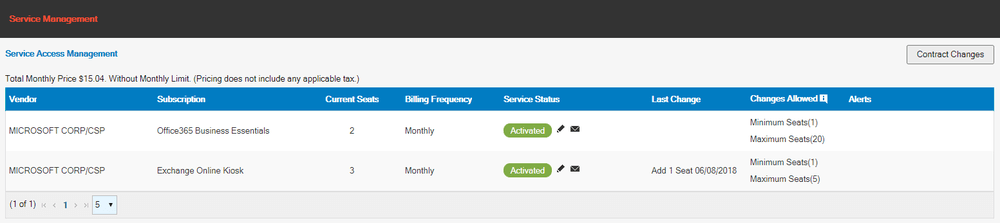
  • Once logged in to the portal you will see a screen similar to this one that lists the O365 subscriptions your tenet has.
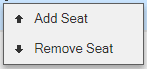
  • Click on the Edit Pencil for the subscription you want to modify, a box will appear asking if you want to Add or Remove seats
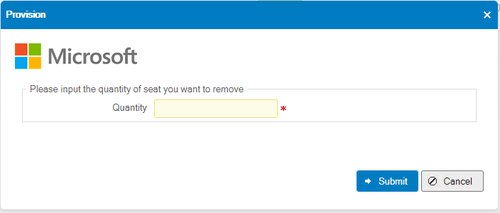
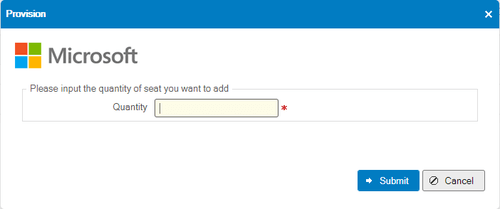
  • Select the proper item and you will be prompted with a spot to add or remove seats
  • Enter the quantity of change and press submit.  There will be a process that takes several seconds with a “Please wait” message.  Once completed it will return to the main screen.
  • Licenses are now activated on the system and within 5 minutes should be active in the Microsoft O365 Portal.


If you have questions or problems with the system please contact the Mytech Helpdesk.